
Не могу избавиться от вируса-майнера
Здравствуйте! Сразу прошу прощения за столько текста – хочу подробнее описать ситуацию. Окончательно замучал вирус майнер. Не пойму, откуда у него конкретно растут ноги… Началось это давно. Есть у меня два ноутбука и два модема для подключения Интернета. Провайдер украинский – Интертелеком. Использовались они раздельно по парах. Почти год назад нужда в двух модемах отпала – пользовались одним только на своём, а когда нужно было – раздавал интернет со своего ноута через прогу VirtualRouter. И тут один раз я заметил, что что-то грузит систему на 52-54%. Захожу в Диспетчер задач – ничего. Нагрузка тоже падает моментально до нормальной. Закрываю Диспетчер, и нагрузка снова повышается до вышеуказанной. Если же открыть Диспетчер и не трогать ноут, то через какое-то время Диспетчер сам закроется, и майнер опять запустится. Мучился я с этим неделю. В конце концов переустановил Винду. Скажу сразу – образ Windows оригинальный, чистый, безо всяких дополнений.
После переустановки подключил тем же способом Интернет, а вечером опять всё повторилось. Почитав много инфы, пришёл к выводу, что вирус залез в бут-сектор и самовосстанавливается. Отформатировал я диск, пофиксил MBR через /FixMbr и /FixBoot. Думал, что всё позади. Поставил всё заново, подрубил Инет и оставил на ночь включенным. А утром опять то же самое: загрузка на 53%. Потом был момент – поставил Norton Security – он находил вирусы и удалял. Но после окончания лицензии, на третий день всё по новой. Уже не знаю, что делать… А добило сегодня то, что на втором ноуте тоже эта зараза появилась. Но прикол в том, что второй ноут где-то почти год не подключался к Интернету через модем – все время ловил только Wi-Fi или от первого ноута (через прогу VirtualRouter), на котором уже была эта зараза, или от смартфонов. А как только сегодня впервые после такого перерыва подключил к нему модем – вирус объявился буквально через часа три. Ниже прикрепил лог.
P.S. В ходе борьбы с вирусом я находил и удалял некоторые его части. Если это делать, то он словно «взбешивался», и начинали открываться куча процессов: «Eter.exe», «cmd.exe», «svchost.exe». Доходило до 200 с хвостиком процессов иногда… Если нужно, могу поподробнее потом описать, где и какие именно «сидят».
P.P.S. Первый раз его файлы были в папках Program Files (… x86)/Internet Explorer/bin. Также в файле «hosts» были добавлены различные адреса, типа «xxx.yourmotherfuc*er», «123.xx. hopheylalaley» и т.п. Сейчас этого нет. Подозреваю, что либо новая версия майнера, либо вообще другой майнер, но с тем же принципом.
 Не могу избавиться от вируса майнера. notepad.exe
Здравствуйте, обнаружился на компьютере вирус майнер, Dr. Web cureit нашел 2 файла и я их удалил.
Не могу избавиться от вируса Neshta
Прошу помочь, недавно(вчера), подхватил Нешту. Провёл проверку Vba32Check, сделал всё как сказано.
Помогите, не могу избавиться от вируса!
Помогите, не могу избавиться от вируса! Антивирусник не находит, не могу скачать музыку, выдаёт.
Не могу избавиться от вируса, т.к. он запускается до старта антивируса
Распаковал архив, в нем оказался вирус. Из за него при старте хрома открывается страница mail.ru, а.
How To Remove Waupdat3.exe

Have you just started to see a process named Waupdat3.exe in your Windows Task Manager? Is the process seems eating more than enough of your system resources? Is this exe file is causing frequent hassles in form of system crash or freezing issues? In case you identify your answer is affirmative, then you might want to learn how all such issues are occuring. Probably, the term Waupdat3.exe present on your machine would be a trojan or a cryptominer that eats system resources mostly with intention to mine digital currency to help its authors earning illicit profit. To learn more about this term and how to treat a compromised computer, keep reading this article.
As already mentioned, Waupdat3.exe is just a Trojan Coin miner which use to contaminate targeted computers with intention to mine digital money without seeking user’s approval. Technically, it’s compatible to mine all well known digital currencies such as Monero, Darkcoin, Bitcoin, and many more. This indicates that Waupdat3.exe can be highly helpful to earn profit but only for its creators, not for users. On a compromised machine, the process will take a large quantity of system resoruces to mine crypto currencies, but for a user’s point of view, this trojan can be a highly precarious or disastrous.
Being a trojan miner, Waupdat3.exe will consume more than 70 percent of computer’s resources like CPU or GPU, whcih causes other genuine applications or games to keep stammering for resoruces. The system will keep frequently stammering or stuttering throughout the day, that makes their online sessions completely terrible in no time. In order to overcome such issues, we highly suggest users to check through guidelines under this article to identify and remove Waupdat3.exe along with all its associated elements completely.
Name: Waupdat3.exe
Type: Trojan, coin miner, spyware
Description: Classified as another cryptominer application, Waupdat3.exe is a new identitification whcih is not safe for computers.
Distribution: Malicious links or ads, freeware or shareware installer packages, email attachments or links, and so on.
Removal: We suggest you checking through the guidelines under this article to identify and remove Waupdat3.exe from compromised computers easily.
Special Offer (For Windows)
Waupdat3.exe can re-install itself if its associated files remain on system somehow. We suggest users to try Spyhunter to check and clean their system against all malicious files completely.
For more information, read SpyHunter’s EULA, Threat Assessment Criteria, and Privacy Policy. Spyhunter checks that your computer has malware with its free trial version. If found any threat, it takes 48 hours time for its removal. If you need to eliminate Waupdat3.exe instantly, you are required to purchase licensed version of this software.
As mentioned earlier, cyber-criminals have expertise to use some of the services offered by Windows System process as vulnerabilities. They usually mimic a legitimate system process with name of the Trojan or malware. They create the process of a Trojan same as some legitimate system process. In some cases, they easily get differentiated from legit processes however; some cases can be extremely difficult to distinguish.
If you examine the Windows process category in the Task Manager, you would easily notice the legitimate system process. However, if you notice duplicate files process, one must be a malware. This type of Trojan or malware continuously mines bitcoin or other crypto-currencies and this is a very high resource extensive process. The overall speed and performance of the PC gets extremely slow and sluggish. For depth enquiry, you can right click on the doubtful process and choose file location option in order to see the associated program. As a simple rule, if the file is stored in Windows/System32 folder, it is legitimate.
On the other hand, if the process is stored in the user’s processes or “Open the file” for the process leads to any random directories then it is doubtful. You should immediately scan your work-station with a powerful anti-malware tool. Remember that manual removal of harmful process related to Trojan or suspicious files are very difficult due to its deep intrusion and integration with the OS.
How to Remove Waupdat3.exe
The first thing that you should do is to scan your work-station with a powerful anti-malware tool and that will be very helpful. On the other hand, if you have backup of your important data in any external clean location such as hard-drive or pen-drive etc. then formatting the infected hard-drive of the PC may also work for you. Remember that formatting the hard-drive may work for one PC but if the infected PC is connected with a network of PCs then this step will go in vain.
Click on the “Download” button to use “SpyHunter” anti-malware tool to clean your workstation.
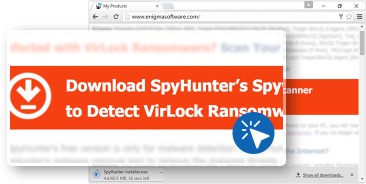
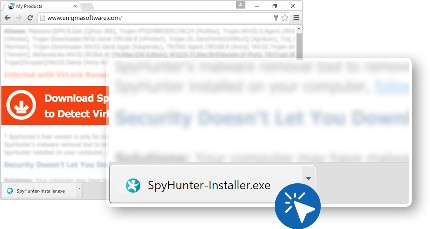
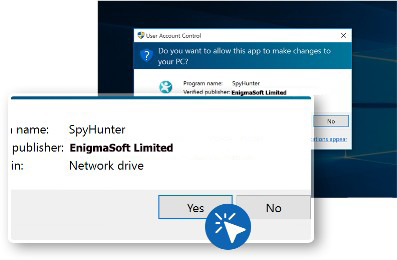
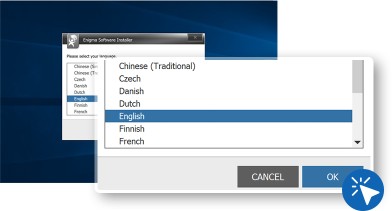
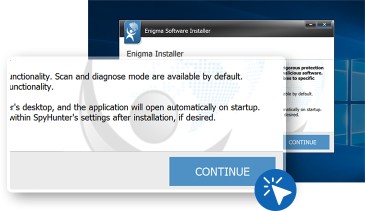
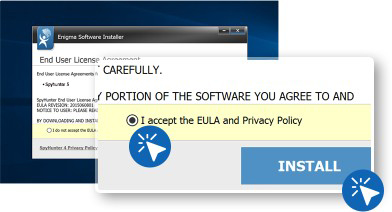
The next step is to use “SpyHunter” for PC scanning and malware removal.
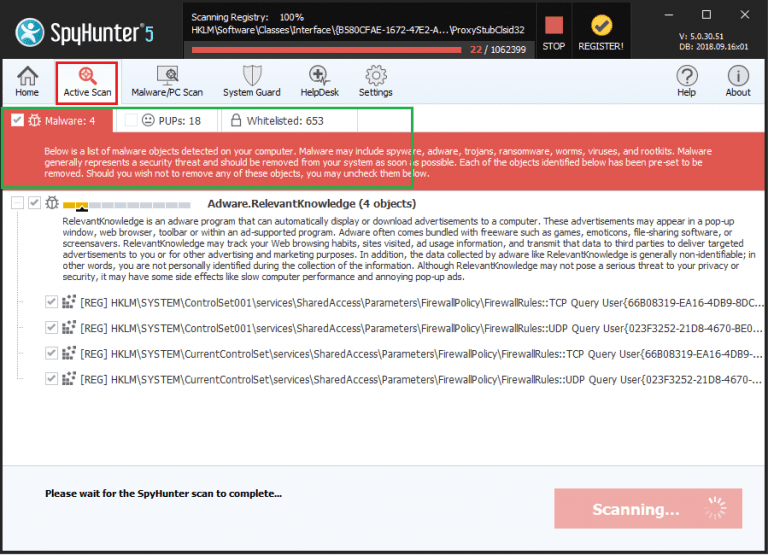
Wait for the few minutes to scan gets completed. On completion, it scan result report is presented on the screen.
⇒ Register for the Spyhunter and remove Waupdat3.exe and all detected threats
To delete Waupdat3.exe and all associated threats found through the system scan, you need to register for the SpyHunter:
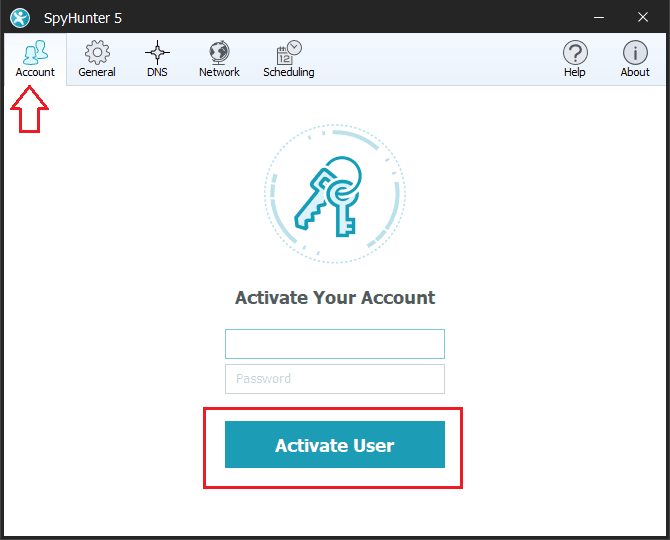
⇒ Steps to remove Waupdat3.exe and other detected threats:
Spyhunter antivirus tool categorizes the type of objects detected during system scans in total five sections – “Malware“, “PUPs” (Potentially Unwanted Programs), “Privacy“, “Vulnerabilities“, and “Whitelisted objects“
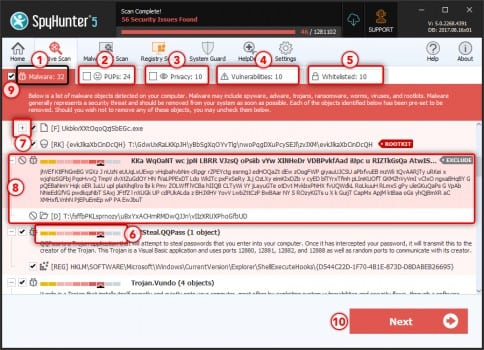
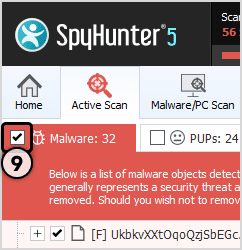
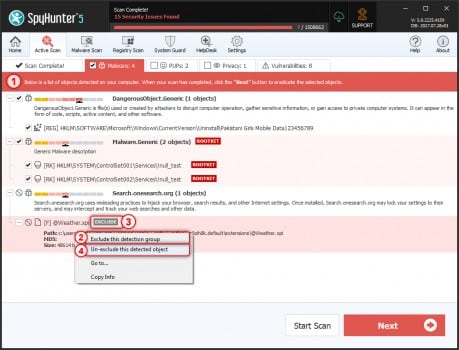
Select the object you want to remove and then click on Next button (you can quarantine an object so that you can anytime restore it to the system using restore feature)
Special Offer (For Windows)
Waupdat3.exe can re-install itself if its associated files remain on system somehow. We suggest users to try Spyhunter to check and clean their system against all malicious files completely.
For more information, read SpyHunter’s EULA, Threat Assessment Criteria, and Privacy Policy. Spyhunter checks that your computer has malware with its free trial version. If found any threat, it takes 48 hours time for its removal. If you need to eliminate Waupdat3.exe instantly, you are required to purchase licensed version of this software.
Что такое update.exe? Это безопасно или вирус? Как удалить или исправить это
Что такое update.exe?
update.exe это исполняемый файл, который является частью My.Freeze.com NetAssistant Программа, разработанная Freeze.com, Программное обеспечение обычно о по размеру.

Это update.exe безопасно, или это вирус или вредоносная программа?
Первое, что поможет вам определить, является ли тот или иной файл законным процессом Windows или вирусом, это местоположение самого исполняемого файла. Например, такой процесс, как update.exe, должен запускаться из C: \ Program Files \ Freeze.com \ My.Freeze.com NetAssistant \ update.exe, а не в другом месте.
Если статус процесса «Проверенная подписывающая сторона» указан как «Невозможно проверить», вам следует взглянуть на процесс. Не все хорошие процессы Windows имеют метку проверенной подписи, но ни один из плохих.
Самые важные факты о update.exe:
Если у вас возникли какие-либо трудности с этим исполняемым файлом, вы должны определить, заслуживает ли он доверия, перед удалением update.exe. Для этого найдите этот процесс в диспетчере задач.
Найдите его местоположение (оно должно быть в C: \ Program Files \ Freeze.com \ My.Freeze.com NetAssistant \) и сравните размер и т. Д. С приведенными выше фактами.
Если вы подозреваете, что можете быть заражены вирусом, вы должны немедленно попытаться это исправить. Чтобы удалить вирус update.exe, вам необходимо Загрузите и установите приложение полной безопасности, например Malwarebytes., Обратите внимание, что не все инструменты могут обнаружить все типы вредоносных программ, поэтому вам может потребоваться попробовать несколько вариантов, прежде чем вы добьетесь успеха.
Могу ли я удалить или удалить update.exe?
Не следует удалять безопасный исполняемый файл без уважительной причины, так как это может повлиять на производительность любых связанных программ, использующих этот файл. Не забывайте регулярно обновлять программное обеспечение и программы, чтобы избежать будущих проблем, вызванных поврежденными файлами. Что касается проблем с функциональностью программного обеспечения, проверяйте обновления драйверов и программного обеспечения чаще, чтобы избежать или вообще не возникало таких проблем.
Однако, если это не вирус, и вам нужно удалить файл update.exe, вы можете удалить My.Freeze.com NetAssistant с вашего компьютера, используя программу удаления, которая должна находиться по адресу: MsiExec.exe / X
Распространенные сообщения об ошибках в update.exe
Наиболее распространенные ошибки update.exe, которые могут возникнуть:
Как исправить update.exe
Если у вас возникла более серьезная проблема, постарайтесь запомнить последнее, что вы сделали, или последнее, что вы установили перед проблемой. Использовать resmon Команда для определения процессов, вызывающих вашу проблему. Даже в случае серьезных проблем вместо переустановки Windows вы должны попытаться восстановить вашу установку или, в случае Windows 8, выполнив команду DISM.exe / Online / Очистка-изображение / Восстановить здоровье, Это позволяет восстановить операционную систему без потери данных.
Чтобы помочь вам проанализировать процесс update.exe на вашем компьютере, вам могут пригодиться следующие программы: Менеджер задач безопасности отображает все запущенные задачи Windows, включая встроенные скрытые процессы, такие как мониторинг клавиатуры и браузера или записи автозапуска. Единый рейтинг риска безопасности указывает на вероятность того, что это шпионское ПО, вредоносное ПО или потенциальный троянский конь. Это антивирус обнаруживает и удаляет со своего жесткого диска шпионское и рекламное ПО, трояны, кейлоггеры, вредоносное ПО и трекеры.
Мы рекомендуем вам попробовать это новое программное обеспечение, которое исправляет компьютерные ошибки, защищает их от вредоносных программ и оптимизирует производительность вашего ПК. Этот новый инструмент исправляет широкий спектр компьютерных ошибок, защищает от таких вещей, как потеря файлов, вредоносное ПО и сбои оборудования.
Загрузите или переустановите update.exe
Вход в музей Мадам Тюссо не рекомендуется загружать замещающие exe-файлы с любых сайтов загрузки, так как они могут содержать вирусы и т. д. Если вам нужно скачать или переустановить update.exe, мы рекомендуем переустановить основное приложение, связанное с ним. My.Freeze.com NetAssistant.
Информация об операционной системе
Ошибки update.exe могут появляться в любых из нижеперечисленных операционных систем Microsoft Windows:
Waupdat3.exe Virus ⛏️ (Coin Miner Trojan) Removal
Waupdat3.exe process is a Trojan Coin Miner that uses the contaminated computer’s resources to mine digital money without your approval. It can be Monero, Bitcoin, DarkCoin or Ethereum.
About “Waupdat3.exe”
Waupdat3.exe will certainly use greater than 70% of your CPU’s power as well as graphics cards resources

It is better to prevent, than repair and repent!
What this suggests, is that when the miners are running you will certainly discover that your computer system is running slower and video games are stuttering or freezing due to the fact that the Waupdat3.exe is utilizing your computer system’s resources to generate revenue for themselves. This will certainly create your CPU to run at very high temperatures for extended time periods, which could reduce the life of the CPU.
Waupdat3.exe Technical Summary.
Reducing down your computer, running at peek degree for long times might cause damage to your device and elevate electrical power expenses.
CPU is not the only computer element that is exploited by Waupdat3.exe miner. graphic card is also under attack, and while small and well-protected CPU cooling system is not very easy to damage, GPUs have big and easy-to-access fans, which can be easily broke if affected while spinning, for instance, by the user much before the coin-miner injection. Malfunctioning cooling system, together with the really high load caused by Waupdat3.exe can easily lead to GPU failure.
When a computer is contaminated with Waupdat3.exe trojan, usual signs include:
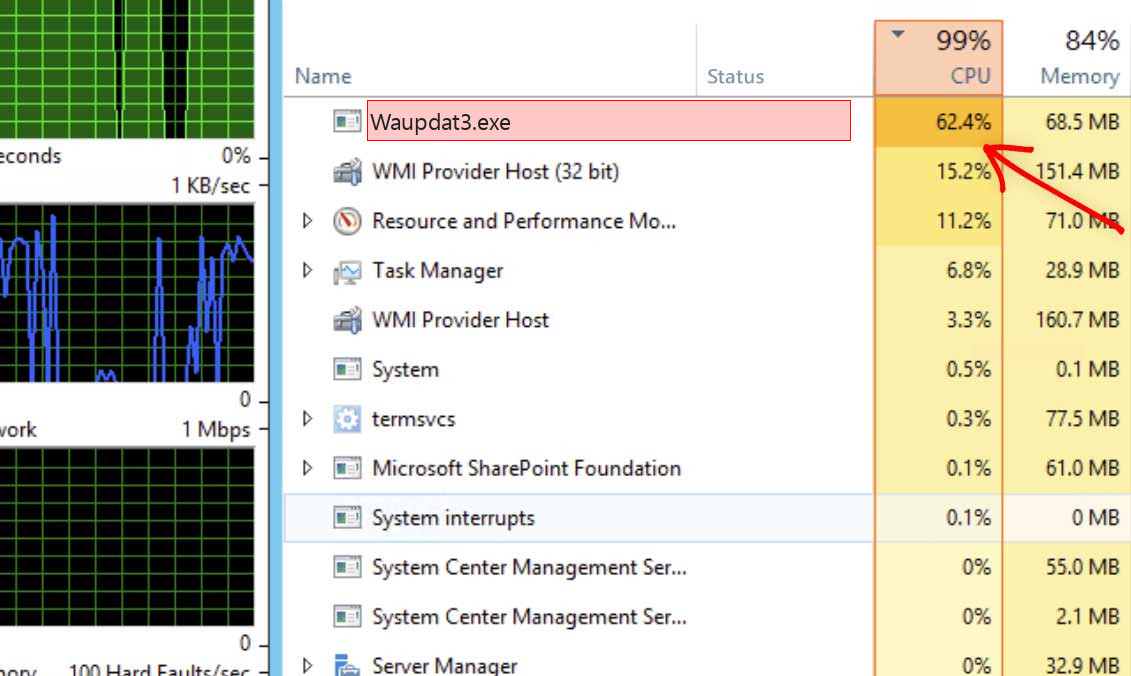
Waupdat3.exe – Very high CPU as well as graphics cards usage
How to detect Waupdat3.exe Miner Malware?
Unlike ransomware, cryptocurrencies extracting threats are not obtrusive and are more probable to stay unnoticed by the target.
Nonetheless, finding Waupdat3.exe hazard is reasonably very easy. If the victim is using a GridinSoft Anti-Malware it is virtually particular to discover any kind of mining malware. Even without a safety solution, the target is likely to think there is something wrong since mining bitcoin or various other cryptocurrencies is a very source intensive procedure. The most common signs and symptom is a recognizable as well as typically constant drop in performance.
This signs and symptom alone doesn’t tell the target what the specific issue is. The individual can experience comparable problems for a selection of reasons. Still, Waupdat3.exe malware can be very disruptive due to the fact that it will certainly hog all available computer power and the sudden change in the way the contaminated device performs is most likely to make the victim try to find solutions. If the equipment of the impacted gadget is effective sufficient, and also the sufferer does not spot and also eliminate the danger promptly, the power usage as well as as a result the power costs will certainly go up visibly as well.
Intent users may also see strange alterations in the Task Manager, or any other program for checking the actually active tasks. System tasks, that are usually launched in the thread of Windows programs, are listed as the task launched by the user. Besides this difference, you can also observe that the picture of the notebook, that is common for system apps running in the background, is changed by another picture. And sometimes, Waupdat3.exe malware does not even try to mimic the system processes, and can be spectated with his original name.
How to Remove Waupdat3.exe Malware?
As soon as the target has actually established that their problem is Waupdat3.exe hazard, for the common user there are a couple of solutions.
Firstly usage GridinSoft Anti-Malware would be the most effective solution. There is no lack of available cybersecurity software application that will certainly identify and also get rid of mining malware.
If the infected device does not contain crucial information or the target has backed up such data in a clean location, and also the user has some experience, formatting the difficult drives could work. This service might not be adequate if the infection has infiltrated several networks the maker belongs of.
Delete WAUPDAT3.EXE
| Warning! WAUPDAT3.EXE is a very dangerous malware and it will drop tons of threats on the computer, so the highest priority is scanning the computer with Anti-malware tools. Here we recommend tools : | |
| Click here to download Antivirus Tool for Windows |
Note: The scanner is free and please check EULA and Privacy Policy.
What Is WAUPDAT3.EXE?
WAUPDAT3.EXE is commonly found recently, and many users encounter it on their PCs. When they try to test it with the applications, they found that it could not be detected. In fact, this article is going to let you know more about this item. WAUPDAT3.EXE is a Trojan, and it can bring virus into PC. It will fake as a normal application so that the anti-virus programs cannot detect it and let it go freely.
WAUPDAT3.EXE has another special powder which is to embed password to normal documents without your permission. What is its purpose? It is for money of course. When you want to open the files, you are alerted that the files are encrypted. If you don’t know password, you could not read it. And it will suggest you to solve it by following its steps, while you should spend huge amount of money.
If you don’t want to be cheated by such simple tricks, you should try to remove WAUPDAT3.EXE immediately. As its hacker has done utmost to program it from being removed, you should follow professional guidelines. In this way, our team has compiled some useful guides here for your reference. Please check them.

Harmful Properties of WAUPDAT3.EXE
1. It rogue search engine provides unsafe links which cause damage to your computer.
2. It takes over your browser homepage and search engine with force
3. It is able to bypass antivirus and roots deeply on your system
4. It connects remote server to transfer numerous annoying advertisements.
5. It is also acting as Spyware which steal your privacy
6. It has the capability to help attacker enter your system remotely
Guides to Help uninstall WAUPDAT3.EXE for
Windows & Mac OS Users
Part 1 Guide to Remove WAUPDAT3.EXE from Windows OS
Part 2 – Remove WAUPDAT3.EXE from Mac OS
Note! Some Steps May Need You to Restart Web Browser or Computer, Please Press Ctrl + D keys to Bookmark This Page Before You Begin
Part 1 Guide to Remove WAUPDAT3.EXE from Windows OS
Removal Method – Manually Remove WAUPDAT3.EXE (For Users with PC Expert Skills)
Manual Removal involves changing the registry and if you have no enough experience and techniques in computer operation, you may cause a serious trouble on the PC with this methods. Then we recommend Anti-malware tools here:
Note: The scanner is free and here the best recommendation for you.
Step-1 Remove WAUPDAT3.EXE from your browser (Chrome, Firefox, IE, Edge).
 On Chrome
 On Chrome
 Run Chrome >click the “Menu” button> select “Settings“


Click “Extensions“> click the “trash can icon”

On Mozilla Firefox
 On Mozilla Firefox
 Run Firefox> click the “Menu” button> click the “Add-ons” button

select Extensions or Add-ons panel >click Disable or Remove button


On Internet Explorer
 On Internet Explorer
 Run Firefox> click the “Menu” button> click the “Manage Add-ons” button

click “Extensions“> click the “Disable” 

On Microsoft Edge
 On Microsoft Edge
 Step-2 Uninstall WAUPDAT3.EXE associated software from PC system.
(for all-version Windows OS)
1. Press “Windows + R” keys on your keyboard to open Run window;


2.Put in appwiz.cpl and press OK key to view the programs list in Control Panel;


3. Select all suspicious software you want to remove and click Uninstall.


Step-3 Delete malicious registry entries added by virus and malware from Registry.
1. Press “Windows + R” keys on your keyboard to open Run window;

2. Put in “Regedit ” and press OK;


3. Press “CTRL + F” keys and put in the name of virus or malware to locate and delete its malicious files.

If you cannot find out the files through this way, please manually locate these entries:
HKLM\SOFTWARE\Classes\AppID\.exe
HKEY_LOCAL_MACHINE\SOFTWARE\Microsoft\Windows NT\CurrentVersion\virus name
HKEY_CURRENT_USER\Software\Microsoft\Windows NT\CurrentVersion\Winlogon “Shell” = “%AppData%\.exe”
HKEY_CURRENT_USER\Software\Microsoft\Windows\CurrentVersion\Run ‘Random’
HKEY_LOCAL_MACHINE\Software\Microsoft\WindowsNT\CurrentVersion\Random
Warning! In this step, you may not find out all the files given by viruses or malware or you may accidentally delete the system registry files, which will lead to unsuccessful removal or huge damage on the computer system. Once again, if you are not an expert users, do not remove WAUPDAT3.EXE manually.
Easy Way- Use Anti-malware
If you are not an advanced PC users with rich experience and knowledge on handling PC virus, we highly recommend you to use the following professional Malware Scanner to see if you have WAUPDAT3.EXE. You’ve got two offers here, try either of them to fix your computer now:
Step-1 Install SpyHunter Anti-Malware to scan WAUPDAT3.EXE.
They are both Clean and easy-operated tools and you can choose the one you like to scan WAUPDAT3.EXE or other malware from your computer.
1. Click the button below to download SpyHunter Anti-Malware and check SpyHunter’s EULA and Privacy Policy :
(Note: If your computer have already installed another anti-malware software, they may block this download due to False Positive detection. Please shut down these software or just uninstall it, then come back here and click to download again. It will work. )

2. After downloaded, double-click SpyHunter-Installer to start installing SpyHunter Anti-Malware.


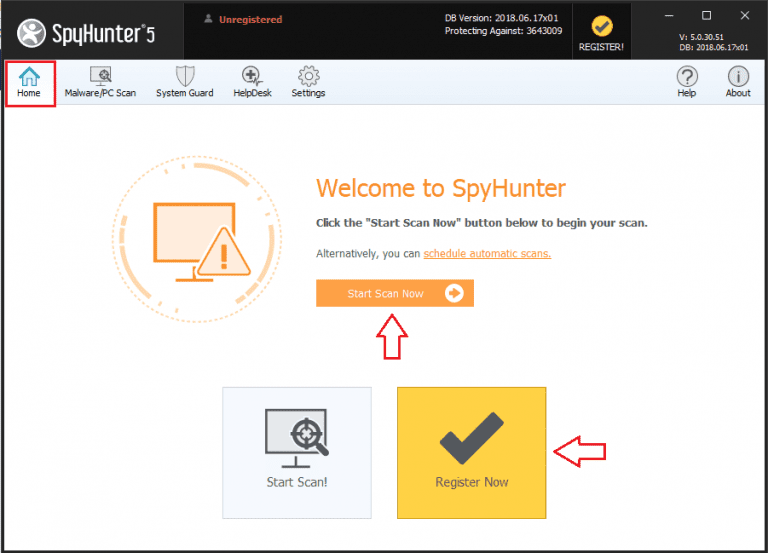
3. When SpyHunter Anti-Malware is installed, run a Start Scan Now to detect virus and malware:


Step-2 Install WiperSoft Anti-Malware to safeguard entire computer
(This step will help fix all the registry error and system bugs. WiperSoft Anti-Malware is the best option. It guides the PC from the viruses infection and malware re-activated. And it can periodically maintain the system for you. It is a good choice for users who has busy schedule and little knowledge here.)
 (Note: If your computer have already installed another anti-malware software, they may block this download due to False Positive detection. Please shut down these software or just uninstall it, then come back here and click to download again. It will work. )

2-Double-click WiperSoft-installer.exe to start the installation, and click “Scan Now” to detect all files related to WAUPDAT3.EXE:

3-After WiperSoft completes the scan, you could solve all related problem.