XBox 360 Controller
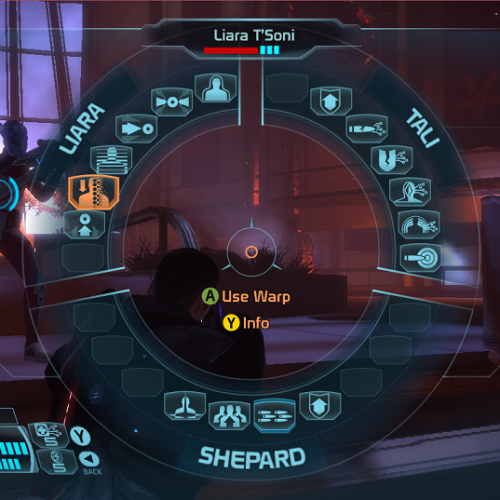
Этот мод добавляет полную поддержку контроллера XBOX 360 для Mass Effect 1 на ПК.
| Автор / ы : | Dybuk |
| Просмотров : | 6952 ( +1 ) |
| Скачиваний : | 1139 |
| Прислал / (а) : | Zhе_НоLTi |
| Дата создания : | 13.06.2017 14:40:03 |
|
| |
| Поделиться : | |
| Теги : | Controller, HUD, Xbox360, mass effect, XBOX 360, modification, M.E.T.U.I.M., Mod, mass effect 1, me1 |

| Этот мод добавляет полную поддержку контроллера XBOX 360 для Mass Effect 1 на ПК. Игра Mass Effect поставляется со всеми оригинальными интерфейсами контроллера XBOX, но в очень сломанном состоянии с удаленной функцией. Этот мод исправляет эти проблемы и, при необходимости, повторно реализует функции. Мод переключается на использование всех пользовательских интерфейсов xbox, за исключением мини-игр / нагрузок и настроек. Эти исключения были скорректированы для работы с контроллером. Установка этого мода нарушит некоторые элементы поддержки клавиатуры и мыши. Консоль будет работать нормально. Если вы хотите играть с клавиатурой и мышью, удалите этот мод. 1.2.0 Примечания к выпуску Монтаж4. Скопируйте содержимое каталога «Mass Effect» в каталог установки, переопределяя оригиналы (сначала создайте резервные копии). Эти файлы должны переопределять исходные файлы. Примеры пути установки: Основные вопросы после установки: — Отсутствует силовое колесо; Я не могу поместить очки в статистику; Низкая чувствительность при прицеливании. Вы скопировали конфигурацию правильно, но вы не заменили binaries игры. — Нельзя открывать контейнеры. Вы проигнорировали инструкции и скопировали конфигурацию в папку с игрой (ту, у которой все файлы по умолчанию .ini). Их необходимо скопировать в профиль пользователя. — Отсутствуют подсказки контроллера. Вы неправильно скопировали конфигурацию. — Контроллер не работает. Видео установки: Все еще проблемы с установкой? Попробуйте посмотреть это видео ниже (спасибо его автору). Mass Effect 3 «Gamepad Support»Доработка: by Oddisey007
Tony_Redgrave
лучше бы написал что добавил/изменил. по твоему людям(читерам) прийдётся по вкусу править ещё и твой файл под свои вкусы?
Tony_Redgrave изменил только только то что в описании. И подкоректировал работу геймпада, больше ничего не трогал
Oddisey007 И это всё?
Oddisey007 дабы было видно насколько твой труд оказался существенен, надо было написать что «ДО», а что «ПОСЛЕ», а то так непонятно, этоль полностью переработанная функция которою можно скопировать и вставить или неполностью, ты просто взял в нескольких местах, поменял значение и подогнал по геймпад. Непонятно. zlodey444 Голубая птичко?! О_о
Oddisey007 : «Спойлер? Не, не слышал. » )))
ОТСТУПНИК Style нет знаешь красная xD
zlodey444 Не,не,не. зелёная :DDD
ЖЭKA
LanKastar Тебе ещё 8 уровней качать, так что не отвлекайся на пустяки.
Геймпад в игре не работает! Что делать, поиграть ведь хочется?
Не, господа, так не пойдет. До этого файлика была поддержка клаво-мыши, после него стала геймпадо-клаво-мышь. По сути, с геймпада нормально не поиграть, выбор ответа и лазанье в меню только мышью, а в бою умения применять только клавой. То есть перед теликом нормально не поиграешь. Я бы еще понял, если бы геймпад-мышь, но клаво-геймпад-мышь, это перебор. Как говорится, за попытку ставлю «пять», а по предмету «неуд». Please log in or registerTo enjoy the benefits of Nexus Mods, please log in or register a new account ME1ControllerFile informationLast updatedOriginal uploadCreated byUploaded byVirus scanTags for this modAbout this modMass Effect 1 Controller Support (Power Wheel) This mod does not have any known dependencies other than the base game.Mods requiring this fileAuthor’s instructionsFile credits— Moonshine for his work on ME2 and ME3 which inspired me to make this MOD. Donation Points systemThis mod is not opted-in to receive Donation Points Version 1.2.2Version 1.2.1Version 1.2.0Version 1.1.1— Changes the behavior of the X/B button when drawing/holstering your weapon. This should now work like the xbox. — Adding a 50% drop in right stick sensitivity when zoomed in. — Further tweaks to correct mistakes in the tutorial strings. — Fixes Mako control weirdness introduced by the sensitivity changes in 0.3.0. — Controller sensitivity for camera movement changed based on frame rate. The higher the frame rate the more sensitive the stick. — Allow user to enter custom name during character creation. Keyboard required. — Removes the inverted Y axis by default. 0.0.14 Release Notes — Changes the way the Mako zoom operates to be like the XBOX360. This could be a risky change as I’m using a class variable called m_nCurConvSelection to hold zoom state. 0.0.13 Relaase Notes — Fixes the intermittent crash when browsing the map (hopefully). 0.0.12 Release Notes — Switches the Mission Computer (aka the pause screen) controls to operate on from the Left Stick in a similar way to the conversation wheel instead of using DPad emulation. The 0.0.11 Release Notes — Allows the Quasar game at the back of Flux to be played with the controller. 0.0.10 Release Notes — Fixes the accidental mapping of mako thrusters to the Y button. — Fix Tutorial messages for Femshep. — Switch Mako thrust to the A button. X button is supposed to be for leaving and going back to the Normandy. — Fixes icon not getting updated when uninstalling xmods. — Fixes Left and Right Analog stick inside the map screen — Fixes Right Analog scroll on the inventory screen. — Fixes sensitivity issues for some controllers. — Uninstalling xmods will now work but the icon will not show as blank. Still needs work. — Added LB tap for last weapon switch.
This MOD adds full XBOX 360 controller support for playing Mass Effect 1. The Mass Effect game shipped with all the original XBOX controller interfaces but in a very broken state with some functionality removed. This mod corrects these issues and re-implements features where necessary. The MOD switches over to use all the xbox user interfaces, with the exception of mini games/loadsave and settings. These exceptions have been adjusted to work with the controller. Installing this MOD will break some elements of the keyboard and mouse support. The console will work fine. If you want to play with keyboard and mouse, uninstall this mod. 1.2.2 Release Notes — Removing MEUITM binaries and updating instructions. Installation IMPORTANT: There are TWO INSTALLATION DIRECTORIES. One inside your user profile, one inside the game directory. 1. Run the game at least once to create the games profile settings. 2. Extract the files from the archive using winrar or 7-zip. 3. Copy the contents of Config (Backup originals first) to : C:\Users\ \Documents\BioWare\Mass Effect\Config IMPORTANT: these files are marked as «read only» to prevent the game modifying them on startup. If you want to modify them you 4. Copy the contents of «Mass Effect» directory to your install directory overriding the originals (Back them up first). These files should override the original files. Steam: C:\Program Files (x86)\Steam\steamapps\common Origin: C:\Program Files (x86)\Origin Games 5. Use MassEffectConfig.exe to set resolution and aspect ratio to 16:9 Common Problems — No power wheel appears; I can’t put points into stats; Low sensitivity when aiming; Journal entries don’t work You have copied the config correctly but you have not overridden the game binaries. — Can’t loot containers. — No controller prompts at all You have not copied the config correctly. Or the config files are not being copied as «readonly» right click on them and check that they are marked as readonly. — Controller doesn’t work, can’t get past «Press Start». This MOD will only work against the primary Xinput controller. Check you don’t have other XInput wrappers or controllers attached. — Can’t disable controller vibrations The disable option doesn’t work through the menu. The binaries from here should help disable vibrations. — Parts of the HUD are cut off. This MOD does not support 4:3 resolution. Use the MassEffectConfig.exe to change to 16:9. — Inverted controls, Sensitivity, dead zone. For some reason some users complain of inverted controls and not being able to change sensitivity using the method below. Bindings=( Name=»XboxTypeS_RightX», Command=»Repeat CameraTurnLeftRight 1.0 0.2 | Repeat GuiAxis BIOGUI_EVENT_AXIS_RSTICK_X 1.0 0.2″) Left is for Left stick, Right for Right stick. X for X Axis, Y for Y Axis. Taking the first one as an example: StrafeLeftRight 1.0 0.2 REMEMBER to set the bioinput.ini file back to «read only» before you launch the game. Installation Video Still struggling with the installation? Try watching this video from Stiff Kun (my thanks). Controls This mod uses the same controls as the xbox 360. These can be found here. Mass Effect 2&3 Excellent XBOX 360 Controller MODs for Mass effect 2 and 3 by Moonshine can be found here : Customisation If you want to adjust the sensitivity of the controller. Open bioinput.ini and modify: The Y axis can be inverted in the setup menu. Please log in or registerTo enjoy the benefits of Nexus Mods, please log in or register a new account ME1ControllerFile informationLast updatedOriginal uploadCreated byUploaded byVirus scanTags for this modAbout this modMass Effect 1 Controller Support (Power Wheel) This mod does not have any known dependencies other than the base game.Mods requiring this fileAuthor’s instructionsFile credits— Moonshine for his work on ME2 and ME3 which inspired me to make this MOD. Donation Points systemThis mod is not opted-in to receive Donation Points Version 1.2.2Version 1.2.1Version 1.2.0Version 1.1.1— Changes the behavior of the X/B button when drawing/holstering your weapon. This should now work like the xbox. — Adding a 50% drop in right stick sensitivity when zoomed in. — Further tweaks to correct mistakes in the tutorial strings. — Fixes Mako control weirdness introduced by the sensitivity changes in 0.3.0. — Controller sensitivity for camera movement changed based on frame rate. The higher the frame rate the more sensitive the stick. — Allow user to enter custom name during character creation. Keyboard required. — Removes the inverted Y axis by default. 0.0.14 Release Notes — Changes the way the Mako zoom operates to be like the XBOX360. This could be a risky change as I’m using a class variable called m_nCurConvSelection to hold zoom state. 0.0.13 Relaase Notes — Fixes the intermittent crash when browsing the map (hopefully). 0.0.12 Release Notes — Switches the Mission Computer (aka the pause screen) controls to operate on from the Left Stick in a similar way to the conversation wheel instead of using DPad emulation. The 0.0.11 Release Notes — Allows the Quasar game at the back of Flux to be played with the controller. 0.0.10 Release Notes — Fixes the accidental mapping of mako thrusters to the Y button. — Fix Tutorial messages for Femshep. — Switch Mako thrust to the A button. X button is supposed to be for leaving and going back to the Normandy. — Fixes icon not getting updated when uninstalling xmods. — Fixes Left and Right Analog stick inside the map screen — Fixes Right Analog scroll on the inventory screen. — Fixes sensitivity issues for some controllers. — Uninstalling xmods will now work but the icon will not show as blank. Still needs work. — Added LB tap for last weapon switch.
This MOD adds full XBOX 360 controller support for playing Mass Effect 1. The Mass Effect game shipped with all the original XBOX controller interfaces but in a very broken state with some functionality removed. This mod corrects these issues and re-implements features where necessary. The MOD switches over to use all the xbox user interfaces, with the exception of mini games/loadsave and settings. These exceptions have been adjusted to work with the controller. Installing this MOD will break some elements of the keyboard and mouse support. The console will work fine. If you want to play with keyboard and mouse, uninstall this mod. 1.2.2 Release Notes — Removing MEUITM binaries and updating instructions. Installation IMPORTANT: There are TWO INSTALLATION DIRECTORIES. One inside your user profile, one inside the game directory. 1. Run the game at least once to create the games profile settings. 2. Extract the files from the archive using winrar or 7-zip. 3. Copy the contents of Config (Backup originals first) to : C:\Users\ \Documents\BioWare\Mass Effect\Config IMPORTANT: these files are marked as «read only» to prevent the game modifying them on startup. If you want to modify them you 4. Copy the contents of «Mass Effect» directory to your install directory overriding the originals (Back them up first). These files should override the original files. Steam: C:\Program Files (x86)\Steam\steamapps\common Origin: C:\Program Files (x86)\Origin Games 5. Use MassEffectConfig.exe to set resolution and aspect ratio to 16:9 Common Problems — No power wheel appears; I can’t put points into stats; Low sensitivity when aiming; Journal entries don’t work You have copied the config correctly but you have not overridden the game binaries. — Can’t loot containers. — No controller prompts at all You have not copied the config correctly. Or the config files are not being copied as «readonly» right click on them and check that they are marked as readonly. — Controller doesn’t work, can’t get past «Press Start». This MOD will only work against the primary Xinput controller. Check you don’t have other XInput wrappers or controllers attached. — Can’t disable controller vibrations The disable option doesn’t work through the menu. The binaries from here should help disable vibrations. — Parts of the HUD are cut off. This MOD does not support 4:3 resolution. Use the MassEffectConfig.exe to change to 16:9. — Inverted controls, Sensitivity, dead zone. For some reason some users complain of inverted controls and not being able to change sensitivity using the method below. Bindings=( Name=»XboxTypeS_RightX», Command=»Repeat CameraTurnLeftRight 1.0 0.2 | Repeat GuiAxis BIOGUI_EVENT_AXIS_RSTICK_X 1.0 0.2″) Left is for Left stick, Right for Right stick. X for X Axis, Y for Y Axis. Taking the first one as an example: StrafeLeftRight 1.0 0.2 REMEMBER to set the bioinput.ini file back to «read only» before you launch the game. Installation Video Still struggling with the installation? Try watching this video from Stiff Kun (my thanks). Controls This mod uses the same controls as the xbox 360. These can be found here. Mass Effect 2&3 Excellent XBOX 360 Controller MODs for Mass effect 2 and 3 by Moonshine can be found here : Customisation If you want to adjust the sensitivity of the controller. Open bioinput.ini and modify: The Y axis can be inverted in the setup menu. |