
What is WatsonRC.dat?
WatsonRC.dat is part of Watson Remote Control and developed by Microsoft Corporation according to the WatsonRC.dat version information.
WatsonRC.dat’s description is «Watson Remote Control«
WatsonRC.dat is digitally signed by Microsoft Corporation.
WatsonRC.dat is usually located in the ‘c:\MSOCache\All Users\microsoft.watson.watsonrc12.data\’ folder.
If you have additional information about the file, please share it with the FreeFixer users by posting a comment at the bottom of this page.
Vendor and version information [?]
The following is the available information on WatsonRC.dat:
| Property | Value |
|---|---|
| Product name | Watson Remote Control |
| Company name | Microsoft Corporation |
| File description | Watson Remote Control |
| Internal name | watsonrc |
| Original filename | WatsonRC.dat |
| Legal copyright | © 2007 Microsoft Corporation. All rights reserved. |
| Product version | 12.0.8026 |
| File version | 12.0.8026 |
Here’s a screenshot of the file properties when displayed by Windows Explorer:
Digital signatures [?]
WatsonRC.dat has a valid digital signature.
| Property | Value |
|---|---|
| Signer name | Microsoft Corporation |
| Certificate issuer name | Microsoft Code Signing PCA |
| Certificate serial number | 61062781000000000008 |
Hashes [?]
| Property | Value |
|---|---|
| MD5 | e03fe1d2974d57aed2eebee633d90fef |
| SHA256 | b5754d681e07d00e7f83e36f0889b716dea96441ae7dd03b4d340edd3e413438 |
What will you do with WatsonRC.dat?
To help other users, please let us know what you will do with WatsonRC.dat:
What did other users do?
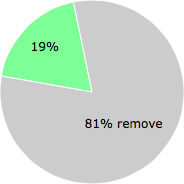
The poll result listed below shows what users chose to do with WatsonRC.dat. 81% have voted for removal. Based on votes from 166 users.
NOTE: Please do not use this poll as the only source of input to determine what you will do with WatsonRC.dat.
Malware or legitimate?
If you feel that you need more information to determine if your should keep this file or remove it, please read this guide.
And now some shameless self promotion 😉
 Hi, my name is Roger Karlsson. I’ve been running this website since 2006. I want to let you know about the FreeFixer program. FreeFixer is a freeware tool that analyzes your system and let you manually identify unwanted programs. Once you’ve identified some malware files, FreeFixer is pretty good at removing them. You can download FreeFixer here. It runs on Windows 2000/XP/2003/2008/2016/2019/Vista/7/8/8.1/10. Supports both 32- and 64-bit Windows.
If you have questions, feedback on FreeFixer or the freefixer.com website, need help analyzing FreeFixer’s scan result or just want to say hello, please contact me. You can find my email address at the contact page.
Comments
Please share with the other users what you think about this file. What does this file do? Is it legitimate or something that your computer is better without? Do you know how it was installed on your system? Did you install it yourself or did it come bundled with some other software? Is it running smoothly or do you get some error message? Any information that will help to document this file is welcome. Thank you for your contributions.
I’m reading all new comments so don’t hesitate to post a question about the file. If I don’t have the answer perhaps another user can help you.
KaiN writes
I don’t want some guy named Watson to have a remote control file on my computer.
_Alex_ writes
WatsonRC.dat is an application debugger included with the Microsoft Windows operating system.. It is named after Doctor Watson of Sherlock Holmes fame, the idea being that it would collect error information (symptoms) following a program crash. The use of the word «Watson» has since been expanded to include general end-user feedback services.
The information obtained and logged by Dr. Watson is the information needed by technical support personnel to diagnose a program error for a computer running Windows. A text file (usually drwtsn32.log) is created whenever an error is detected, and can be delivered to support personnel by the method they prefer. A crash dump file can also be created, which is a binary file that a programmer can load into a debugger. Dr. Watson can be made to generate more exacting information for debugging purposes if the appropriate symbol files are installed and the symbol search path (environment variable) is set.
When a program error occurs in Windows, the system searches for a program error handler. A program error handler deals with errors as they arise during the running of a program. If the system does not find a program error handler, the system verifies that the program is not currently being debugged and considers the error to be unhandled. The system then processes unhandled errors by looking in the registry for a program error debugger for which Dr. Watson is the default.
Hope it helps.
warren bean writes
If this program and the users folder it was located in was removed and deleted and then recovered using EaseUS Data Recovery Wizard and then stored to a flash drive, how do you reinstall the folder to it’s original location so the computer can recognize it?
I accidentally removed this and the users folder because I did not know what the program was for. I also deleted my public documents folder in C:\ and lost most of my desktop programs and icons. Can you explain how to recover these properly?
WhatsApp на ладони: где и как можно обнаружить криминалистические артефакты?

Хотите узнать, какие типы криминалистических артефактов WhatsApp существуют в различных операционных системах и где именно они могут быть обнаружены — тогда вам сюда. Этой статьей специалист Лаборатории компьютерной криминалистики Group-IB Игорь Михайлов открывает серию публикаций о криминалистическом исследовании WhatsApp и о том, какие сведения можно получить при анализе устройства.
Сразу отметим, что в разных операционных системах хранятся различные типы артефактов WhatsApp, и если из одного устройства исследователь может извлечь определенные типы данных WhatsApp, это совсем не означает, что подобные типы данных можно извлечь из другого устройства. Например, если изымается системный блок под управлением ОС Windows, то на его дисках, вероятно, не будут обнаружены чаты WhatsApp (исключение составляют резервные копии iOS-устройств, которые могут быть обнаружены на этих же накопителях). При изъятии ноутбуков и мобильных устройств будут свои особенности. Поговорим об этом поподробнее.
Артефакты WhatsApp в Android-устройстве
Для того, чтобы извлечь артефакты WhatsApp из устройства под управлением ОС Android, исследователь должен иметь права суперпользователя (‘root’) на исследуемом устройстве или иметь возможность иным способом извлечь физический дамп памяти устройства, или его файловую систему (например, используя программные уязвимости конкретного мобильного устройства).
Файлы приложения располагаются в памяти телефона в разделе, в котором сохраняются данные пользователя. Как правило, этот раздел носит имя ‘userdata’. Подкаталоги и файлы программы располагаются по пути: ‘/data/data/com.whatsapp/’.

Основными файлами, которые содержат криминалистические артефакты WhatsApp в ОС Android являются базы данных ‘wa.db’ и ‘msgstore.db’.
В базе данных ‘wa.db’ содержится полный список контактов пользователя WhatsApp, включая номер телефона, отображаемое имя, временные метки и любую другую информацию, указанную при регистрации в WhatsApp. Файл ‘wa.db’ располагается по пути: ‘/data/data/com.whatsapp/databases/’ и имеет следующую структуру:
Наиболее интересными таблицами в базе данных ‘wa.db’ для исследователя являются:
Внешний вид таблицы:
| Имя поля | Значение |
|---|---|
| _id | порядковый номер записи (в SQL таблице) |
| jid | WhatsApp ID контакта, записывается в формате @s.whatsapp.net |
| is_whatsapp_user | содержит ‘1’ если контакту соответствует фактический пользователь WhatsApp, ‘0’ в ином случае |
| status | содержит текст, отображаемый в статусе контакта |
| status_timestamp | содержит временную метку в формате Unix Epoch Time (ms) |
| number | номер телефона, ассоциированный с контактом |
| raw_contact_id | порядковый номер контакта |
| display_name | отображаемое имя контакта |
| phone_type | тип телефона |
| phone_label | метка, ассоциированная с номером контакта |
| unseen_msg_count | количество сообщений которые были отправлены контактом но небыли прочитаны получателем |
| photo_ts | содержит временную метку в формате Unix Epoch Time |
| thumb_ts | содержит временную метку в формате Unix Epoch Time |
| photo_id_timestamp | содержит временную метку в формате Unix Epoch Time (ms) |
| given_name | значение поля совпадает с ‘display_name’ для каждого контакта |
| wa_name | имя контакта в WhatsApp (отображается имя, указанное в профиле контакта) |
| sort_name | имя контакта, используемое в операциях сортировки |
| nickname | ник контакта в WhatsApp (отображается ник, указанный в профиле контакта) |
| company | компания (отображается компания, указанная в профиле контакта) |
| title | обращение (госпожа/господин; отображается обращение, настроенное в профиле контакта) |
| offset | смещение |
Наиболее интересными таблицами в файле ‘msgstore.db’ для исследователя являются:
Внешний вид таблицы:
Внешний вид таблицы:
Внешний вид таблицы:
| Имя поля | Значение |
|---|---|
| _id | порядковый номер записи (в SQL таблице) |
| key_remote_jid | WhatsApp ID партнера по коммуникации |
| key_from_me | направление сообщения: ‘0’ – входящее, ‘1’ — исходящее |
| key_id | уникальный идентификатор сообщения |
| status | статус сообщения: ‘0’ – доставлено, ‘4’ – ждет на сервере, ‘5’ – получено по месту назначения, ‘6’ – контрольное сообщение, ‘13’ – сообщение открыто получателем (прочитано) |
| need_push | имеет значение ‘2’, если это широковещательное сообщение, в ином случае содержит ‘0’ |
| data | текст сообщения (когда параметр ‘media_wa_type’ равен ‘0’) |
| timestamp | содержит временную метку в формате Unix Epoch Time (ms), значение берется из часов устройства |
| media_url | содержит URL передаваемого файла (когда параметр ‘media_wa_type’ равен ‘1’, ‘2’, ‘3’) |
| media_mime_type | MIME-тип передаваемого файла (когда параметр ‘media_wa_type’ равен ‘1’, ‘2’, ‘3’) |
| media_wa_type | тип сообщения: ‘0’ – текст, ‘1’ – графический файл, ‘2’- аудио-файл, ‘3’ – видео- файл, ‘4’ – карточка контакта, ‘5’ — геоданные |
| media_size | размер передаваемого файла (когда параметр ‘media_wa_type’ равен ‘1’, ‘2’, ‘3’) |
| media_name | имя передаваемого файла (когда параметр ‘media_wa_type’ равен ‘1’, ‘2’, ‘3’) |
| media_caption | Содержит слова ‘audio’, ‘video’ для соответствующих значений параметра ‘media_wa_type’ (когда параметр ‘media_wa_type’ равен ‘1’, ‘3’) |
| media_hash | закодированный в формате base64 хэш передаваемого файла, рассчитанный по алгоритму HAS-256 (когда параметр ‘media_wa_type’ равен ‘1’, ‘2’, ‘3’) |
| media_duration | продолжительность в секундах для медиафайла (когда параметр ‘media_wa_type’ равен ‘1’, ‘2’, ‘3’) |
| origin | имеет значение ‘2’, если это широковещательное сообщение, в ином случае содержит ‘0’ |
| latitude | геоданные: широта (когда параметр ‘media_wa_type’ равен ‘5’) |
| longitude | геоданные: долгота (когда параметр ‘media_wa_type’ равен ‘5’) |
| thumb_image | служебная информация |
| remote_recource | ID отправителя (только для групповых чатов) |
| received_timestamp | время получения, содержит временную метку в формате Unix Epoch Time (ms), значение берется из часов устройства (когда параметр ‘key_from_me’ имеет ‘0’, ‘-1’ или иное значение) |
| send_timestamp | не используется, обычно имеет значение ‘-1’ |
| receipt_server_timestamp | время получения центральным сервером, содержит временную метку в формате Unix Epoch Time (ms), значение берется из часов устройства (когда параметр ‘key_from_me’ имеет ‘1’, ‘-1’ или иное значение |
| receipt_device_timestamp | время получения сообщения другим абонентом, содержит временную метку в формате Unix Epoch Time (ms), значение берется из часов устройства (когда параметр ‘key_from_me’ имеет ‘1’, ‘-1’ или иное значение |
| read_device_timestamp | время открытия (чтения) сообщения, содержит временную метку в формате Unix Epoch Time (ms), значение берется из часов устройства |
| played_device_timestamp | время воспроизведения сообщения, содержит временную метку в формате Unix Epoch Time (ms), значение берется из часов устройства |
| raw_data | миниатюра передаваемого файла (когда параметр ‘media_wa_type’ равен ‘1’ или ‘3’) |
| recipient_count | количество получателей (для широковещательных сообщений) |
| participant_hash | используется при передаче сообщений с геоданными |
| starred | не используется |
| quoted_row_id | неизвестно, обычно содержит значение ‘0’ |
| mentioned_jids | не используется |
| multicast_id | не используется |
| offset | смещение |
Внешний вид таблицы:
Также при исследовании WhatsApp в мобильном устройстве под управлением Android надо обращать внимание на следующие файлы:
Файлы, находящиеся в подкаталоге ‘Databases’:
Особенности хранения данных в некоторых моделях мобильных устройств
В некоторых моделях мобильных устройств под управлением ОС Android возможно хранение артефактов WhatsApp в ином месте. Это обусловлено изменением пространства хранения данных приложений системным программным обеспечением мобильного устройства. Так, например, в мобильных устройствах Xiaomi есть функция создания второго рабочего пространства («SecondSpace»). При активации данной функции происходит изменение месторасположения данных. Так, если в обычном мобильном устройстве под управлением ОС Android данные пользователя хранятся в каталоге ‘/data/user/0/’ (что является ссылкой на привычные ‘/data/data/’), то во втором рабочем пространстве данные приложений хранятся в каталоге ‘/data/user/10/’. То есть, на примере месторасположения файла ‘wa.db’:
Артефакты WhatsApp в iOS-устройстве
В отличие от Android ОС, в iOS данные приложения WhatsApp передаются в резервную копию (iTunes backup). Поэтому, извлечение данных этого приложения не требует извлечения файловой системы или создания физического дампа памяти исследуемого устройства. Большая часть значимой информации содержится в базе данных ‘ChatStorage.sqlite’, которая располагается по пути: ‘/private/var/mobile/Applications/group.net.whatsapp.WhatsApp.shared/’ (в некоторых программах этот путь отображается как ‘AppDomainGroup-group.net.whatsapp.WhatsApp.shared’).
Наиболее информативными в базе данных ‘ChatStorage.sqlite’ являются таблицы ‘ZWAMESSAGE’ и ‘ZWAMEDIAITEM’.
Внешний вид таблицы ‘ZWAMESSAGE’:
| Имя поля | Значение |
|---|---|
| Z_PK | порядковый номер записи (в SQL таблице) |
| Z_ENT | идентификатор таблицы, имеет значение ‘9’ |
| Z_OPT | неизвестно, обычно содержит значения от ‘1’ до ‘6’ |
| ZCHILDMESSAGESDELIVEREDCOUNT | неизвестно, обычно содержит значение ‘0’ |
| ZCHILDMESSAGESPLAYEDCOUNT | неизвестно, обычно содержит значение ‘0’ |
| ZCHILDMESSAGESREADCOUNT | неизвестно, обычно содержит значение ‘0’ |
| ZDATAITEMVERSION | неизвестно, обычно содержит значение ‘3’, вероятно, является указателем текстового сообщения |
| ZDOCID | неизвестно |
| ZENCRETRYCOUNT | неизвестно, обычно содержит значение ‘0’ |
| ZFILTEREDRECIPIENTCOUNT | неизвестно, обычно содержит значения ‘0’, ‘2’, ‘256’ |
| ZISFROMME | направление сообщения: ‘0’ – входящее, ‘1’ — исходящее |
| ZMESSAGEERRORSTATUS | статус передачи сообщения. Если сообщение отправлено/получено, то имеет значение ‘0’ |
| ZMESSAGETYPE | тип передаваемого сообщения |
| ZSORT | неизвестно |
| ZSPOTLIGHSTATUS | неизвестно |
| ZSTARRED | неизвестно, не используется |
| ZCHATSESSION | неизвестно |
| ZGROUPMEMBER | неизвестно, не используется |
| ZLASTSESSION | неизвестно |
| ZMEDIAITEM | неизвестно |
| ZMESSAGEINFO | неизвестно |
| ZPARENTMESSAGE | неизвестно, не используется |
| ZMESSAGEDATE | временная отметка в формате OS X Epoch Time |
| ZSENTDATE | время отправки сообщения в формате OS X Epoch Time |
| ZFROMJID | WhatsApp ID отправителя |
| ZMEDIASECTIONID | содержит год и месяц отправки медиафайла |
| ZPHASH | неизвестно, не используется |
| ZPUSHPAME | имя контакта отправившего медиафайл в формате UTF-8 |
| ZSTANZID | уникальный идентификатор сообщения |
| ZTEXT | текст сообщения |
| ZTOJID | WhatsApp ID получателя |
| OFFSET | смещение |
Внешний вид таблицы ‘ZWAMEDIAITEM’:
Другими интересными таблицами базы данных ‘ChatStorage.sqlite’ являются:
Также нужно обращать внимание на следующие каталоги:
Артефакты WhatsApp в Windows
В каталоге ‘C:\Users\%User profile%\ AppData\Roaming\WhatsApp\’ находится несколько подкаталогов:
Файл ‘main-process.log’ содержит информацию о работе программы WhatsApp.
Подкаталог ‘databases’ содержит файл ‘Databases.db’, но этот файл не содержит никакой информации о чатах или контактах.
Наиболее интересными с криминалистической точки зрения являются файлы, находящиеся в каталоге ‘Cache’. В основном это файлы с именами ‘f_*******’ (где * — число от 0 до 9), содержащие зашифрованные мультимедиа-файлы и документы, но среди них встречаются и незашифрованные файлы. Особый интерес представляют файлы ‘data_0’, ‘data_1’, ‘data_2’, ‘data_3’, находящиеся в этом же подкаталоге. Файлы ‘data_0’, ‘data_1’, ‘data_3’ содержат внешние ссылки на передаваемые зашифрованные мультимедиа-файлы и документы.
Также файл ‘data_3’ может содержать графические файлы.
Файл ‘data_2’ содержит аватары контактов (могут быть восстановлены поиском по заголовкам файлов).
Аватары, содержащиеся в файле ‘data_2’:
Таким образом, в памяти компьютера нельзя найти сами чаты, но можно найти:
Артефакты WhatsApp в MacOS
В MacOS можно найти типы артефактов WhatsApp, подобные тем, которые имеются в ОС Windows.
Файлы программы находятся каталогах:
В каталоге ‘C:\Users\%User profile%\Library\Application Support\WhatsApp\Cache\’ находятся файлы ‘data_0’, ‘data_1’, ‘data_2’, ‘data_3’ и файлы с именами ‘f_*******’ (где * — число от 0 до 9). Информация о том, какие сведения содержат эти файлы, описана в разделе «Артефакты WhatsApp в Windows».
В каталоге ‘C:\Users\%User profile%\Library\Application Support\WhatsApp\IndexedDB\’ могут содержаться мультимедийные файлы (файлы не имеют расширений).
Файл ‘main-process.log’ содержит информацию о работе программы WhatsApp.
В следующих статьях этой серии:
В Group-IB знают о киберпреступности всё, но рассказывают самое интересное.
Остросюжетный Telegram-канал (https://t.me/Group_IB) об информационной безопасности, хакерах и кибератаках, хактивистах и интернет-пиратах. Расследования нашумевших киберпреступлений по шагам, практические кейсы с применением технологий Group-IB и, конечно, рекомендации, как не стать жертвой в интернете.
YouTube-канал Group-IB
Фотолента Group-IB в Instagram www.instagram.com/group_ib
Короткие новости в Twitter twitter.com/GroupIB
Компания Group-IB — один из ведущих разработчиков решений для детектирования и предотвращения кибератак, выявления мошенничества и защиты интеллектуальной собственности в сети со штаб-квартирой в Сингапуре.
What is WatsonRC.dat?
could you explain what it is and why it is in my ms under all users cache folder? I’m sorry, but I googled the question and I do not think 2 sites and I can’t scan or delete something I don’t know, and since I never got something else to help from you people I think I have put my trust where my mouth is (so to speak) wrong thank you all for your help
WatsonRC.dat is an application debugger included with the Microsoft Windows operating system. It is named after Dr. Watson of the fame of Sherlock Holmes, the idea being that it would collect error information (symptoms) as a result of a program crash. The use of the word «Watson» has since been expanded to include services of General feedback to the end user.
The information obtained and recorded by Dr. Watson is the information needed by technical support personnel to diagnose a program error for a computer running Windows. A file text (usually drwtsn32.log) is created whenever an error is detected, and can be delivered to support personnel by the method they prefer. A crash dump file may also be created, which is a binary file that a programmer can load into a debugger. Dr. Watson can do to generate better information for debugging purposes if the appropriate symbol files are installed and the symbol search path (environment variable) is set.
When a program error occurs in Windows, the system searches for a program error handler. A program error handler deals with errors when they occur during the course of a program. If the system does not find a program error handler, the system checks that the program is not currently being debugged and considers the error to be unhandled. The system then processes errors unhandled by looking in the registry for a program error debugger for which Dr. Watson is the default value.
Similar Questions
I thought WWDC 2016 was just June 13 at 10 am PDT. Some sites say that the event is from 13 to 17 June. What is the date on which they will announce if there are new products coming out. What is 13?
I bought this drive a few days ago and I’m a little confused on the
the size of the data buffer. The box indicates 16 MB, Toshiba web page says 8 MB, etc.
Nobody knows, what are the data buffer size of this model?
Is there a SW or the request to meet with whom?
BTW, great car, fast, noise, however, extremely when it comes to finding large files.
I have lurked around a bit and it seems that your drive has buffer of 16 MB that is absolutely definitely sure. To check the details of your computer, you can use the tool «Sisoft Sandra». You can download [url href = http://www.sisoftware.net/index.html?dir=&location=downandbuy&langx=en&a=] here [/ URL].
After download, just install it and you will get all information about your computer, as the size of the buffer of your external hard drive.
What is a data? What it is?
What is the date of end SQL server 2008 SP2 support?
Have you tried Google? or:
ASK THE QUESTION IN THE SQL SERVER FORUM:
http://social.msdn.Microsoft.com/forums/en/category/SQLServer
This is SANDEEP, I loaded data using FDM in HFM. How to check if the data is correct or not, what ever the data I was responsible in HFM.
Please tell me how to recover the data and what format, clearly can you me the data verification process step by step.
It would be useful for me.
I think the best way is to extract data from HFM for the same POV that you have loaded FDM and check if it is the same.
If you then use HFM 11.1.2.x version
1. login to the application and go to the menu Administration / extract / data.
2. set the POV that you have loaded the data, then unzip it. You can open the file unzipped in a notebook
3. you can compare the file with the data file generated by FDMEE under Outbox folder.
But what would you give all the data corresponding to the POV that you set. So please ensure that you have the correct POV, defined according to the export FDMEE.
All the members (but 1) are removed from the entity dimension in planning and deployed to essbase.
-What are the data deleted in essbase so?
The data can be restored by restoring the entity dimension? EPMA the entity dimension is still in tact.
It is unclear what exectly arrived, but looks like a change was made in the dimension entity planning (not EPMA) and then deployed (successfully).
In essbase, we see that the entity dimension has only one member left for the appropriate plan types, as in the planning.
If you remove members and then push that yes the essbase data is deleted, if you need back then you will need to go back to your restore process.
I have to wright a policy of confidentiality for the app and I wonder what kind of data are followed by the app.
Their personal data are followed?
And there is no option to disable the default trace, with the exception of the opt-in option?
Analytics is basic analytical or analytical Site catalyst, different data are followed. Read the help guide Analytics to understand what is followed. http://www.Adobe.com/devnet/digitalpublishingsuite/analytics.html
Yes, analytical monitoring is enabled by default. Activation of opt-in option in the app Builder is the way to let the user choose whether to follow-up.
Hello
What the best data type for storing jpeg/gif images?
Idon’t want to use the blob data type
Ordimage is the best?
Thank you.
What the best data type for storing jpeg/gif images?
Idon’t want to use the blob data type
Ordimage is the best?
If you do not want to use BLOBs then, or you can use the ordimage.
It uses ordsys.ordsource for the storage of the image data type. This is a user defined Type of data in advance and has a property called LocalData that stores the actual image. And what is its data type? BLOB OBJECT.
I can’t find a definition of the term «data sharing» what is it? I can turn on and out, but what data is shared and with whom?
Thank you
I would like to know exactly what is to be ‘shared’ and taken from my copy of FireFox.
Hi hornetmo, it’s kind of an important issue because Mozilla (the maker of Firefox), individual authors of Add-ons and the pages that you view all will have different data access.
As you may have read in the above-linked article on the health report, Firefox keeps data on its performance. Please see the ‘Choice of data’ tab of the dialog box Options for more details on the different types of data your Firefox may refer to Mozilla, what it’s for, and how to control:
Websites, particularly popular sites supported by advertising, can capture a lot of information about your activity. Is this something you want to learn more, or simply the browser and Add-ons?
Hello smart people!
I have what is called a data disc on my iMac which is empty (160 GB). Can someone tell me what his, and if I can just use it for file storage?
Thank you very much
2.8 ghz processor intel core duo
4 GB 800 mhz DDR2 SDRAM
Yosemite 10.10.5 OSX
You can use it for storing files.
WHAT IS SELF-T-LOG DATA PROVIDED BY ETI LTD?
Title of the Moose: ETI LTD
Moved from feedback
software. You use a work computer? Could another user downloaded this?
If you are * some * you have no reason to use these data, it can be removed, but is he there
no doubt, I would not delete it immediately.
I am using Windows 7 Home Premium 64-bit. I just deleted a standard user and delete the associated files when asked. However, the username for this account is on the local drive. This is what it looks like:
I don’t mind that the old username rest but I was wondering what is TextHarvester? Is there anything to worry about? It is malware, or have anything to do with Tablet PC Input Panel? The old username can be deleted only in the trash?
It is harmless and is not a malware. If you want you can delete it, but I suggest you do not cause once when you remove it can cause a Registery connecting problems since its illegal to remove yourself and also windows may not respond properly to questions of the user, since there’s not a precedent of data to analyze. I suggest to do disk cleanup and disk defragmentation, and if you’re curious run a malware check, but this is optional.
What is the custom data object? Use of custom data object?
The custom data objects are used to store data that can be linked to a Contact or company record and they are not part of your account or customer contact record. Custom data object records can also go by the name data cards.
Send emails to contacts who have tweeted about a certain subject.
Contacts of segment and filter for inclusion in an email campaign.
(a) what happens if I want to know the type of data in a specific column in the Table.
(b) how to find the column data types?
Can someone help me please. I am new to oracle and try to learn a few tricks
Maybe you are looking for
Is it possible to make the iPhone displays the date instantly on the lockscreen? When I look at my phone to see today’s date, it is very annoying that it only shows the battery for the first seconds.
Hello I need out of loop (several table string) data IN table 2D. I use Replace subset of table inside the loop (after table initialized). Exit works (I see each string right step in his place), but each RollBar according to clear all the previous ch
Hello! So I went on the microsoft Web site to download the software/driver for my «Microsoft sculpt ergonomic mouse», but is the only driver/software they listed the «mouse and keyboard Centre 2.3», which seems to be for their mouse and keyboard. »
Original title: When I connect it to my pc it is read as a model of «Venus Vimcro» of webcam and it doesen’t work, how can I solve it?