
С помощью Tribler можно зарабатывать на торрентах
Торрент-клиент Tribler, использующий технологию блокчейн для анонимного обмена файлами, позволяет авторам зарабатывать на торрентах. Подробности.
Группа исследователей из Делфтского технологического университета разработала значительное обновление для Tribler — уникальной версии децентрализованного и анонимного клиента BitTorrent.
Чем торрент-клиент отличается от других приложений для скачивания и раздачи торрентов?
В первую очередь – работой с использованием блокчейн технологий, позволяющей вознаграждать пользователей за то, что они делятся тем или иным контентом. Использование блокчейн и встроенного поиска Tor, а также возможность прямого спонсирования всех участников делает Tribler весьма привлекательным как для обычных людей, так и для авторов контента. Последним это особенно может пригодиться, ведь распространяя свои работы с помощью децентрализованных сетей, можно получать прибыль единолично, не оплачивая работу лейблов или иных посредников.
 Помимо анонимного обмена файлами, Tribler обещает вознаграждать авторов внутренней криптовалютой.
Другой плюс Tribler – возможность функционирования даже без сайтов со списком раздач. Это позволяет улучшить пользовательский опыт, избавиться от сайтов-посредников и облегчить работу с торрентами для тех, кто не хочет тратить своё личное время на поиск файлов.
Проще говоря, Tribler стремится сделать децентрализованную систему для всех и каждого, которая выживет даже в том случае, если все сайты с торрентами перестанут существовать, а цензура перешагнёт все мыслимые и немыслимые рамки.
У создателей Tribler есть все шансы выполнить свою задачу на все 100%! В настоящее время над проектом работает более 45 студентов магистратуры, 5 научных сотрудников и даже несколько профессоров, поэтому детище Делфтского технологического университета уже имеет мощную команду, способную справиться и с ещё более сложными задачами.
Как и во многих других клиентах BitTorrent, в Tribler есть окно поиска в верхней части приложения. Главное отличие перед другим ПО – результаты поиска, которые видят пользователи, появляются не с других ресурсов или площадок с торрентами, а непосредственно от других пользователей.
Один из главных разработчиков Tribler – профессор Поувелс – стремится превратить BitTorrent в этичный Даркнет. По его мнению, это позволит обуздать пиратство, вознаграждать авторов и перестать зависеть от цензуры крупных площадок, публикующих и модерирующих контент. Кроме того, он и его товарищи рассматривают децентрализацию, анонимность и использование блокчейн в качестве нового интернет-стандарта, который сможет двигать индустрию вперёд.
Стоит отметить, что анонимность торрент-клиента может настраиваться от 1 до 4, а также то, что пользователи Tribler по умолчанию не работают в качестве выходной ноды, что позволяет обезопасить участников от отслеживания.
Тогда кто же работает в качестве «выходного узла» и обеспечивает нормальную работу BitTorrent-клиента? По словам профессора Поуелса, это добровольцы, которые запускают свой код через VPN или VPS сервера. Более того, за последние годы была создана армия самореплицирующихся ботов, которые оснащены собственными кошельками с криптовалютой, выкупающие сервера и запускающие больше своих копий, которые берут на себя большую часть нагрузки.
Они используют примитивную систему эволюции: приобретают VPN для защиты, зарабатывают криптовалюту, после чего обменивают заработанные монеты на трафик для децентрализованного рынка Tribler, взамен получая монеты от пользователей и возобновляя жизненный цикл на следующий месяц согласно тарифам, предоставляемым их провайдерам.
Tribler: скачать торрент анонимно через тор
Скачивание торрента из интернета не очень хорошо видно. Хотя доказано, что большинство загрузок P2P происходит из нелицензионного программного обеспечения, индустрия продолжает преследовать всех, кто использует торрент для загрузки файлов. Хотя они делают это, чтобы загрузить образ ISO Ubuntu. Следовательно, использование обычных клиентов загрузки через торрент для загрузки файлов из этой сети очень рискованно. Однако есть альтернатива, которая позволяет нам легко загружать все типы файлов и, кроме того, с максимальной конфиденциальностью и анонимностью: Триблер.
Tribler это совершенно бесплатный клиент с открытым исходным кодом, основной целью которого является загрузка файлов из торрент-сети с максимальным уровнем анонимность. Для этого этот клиент загрузки имеет сеть маршрутизации, аналогичную сети Tor, которая отправляет пакеты через всех других пользователей этой программы (распределенная сеть), предотвращая отслеживание нашего IP-адреса и, кроме того, предотвращая любой тип цензуры от применяется
Tribler: особенности
Без сомнения, главная особенность этого клиента загрузки торрента анонимность. Tribler имеет систему шифрования, которая шифрует все соединения, которые покидают наш компьютер, и передает их через распределенную сеть, чтобы избежать отслеживания и идентификации. Кроме того, у него есть скрытая начальная система, которая не позволяет им идентифицировать нас, отправляя файл.
В дополнение к конфиденциальности и анонимности, эта программа характеризуется быть очень простым использовать. Он имеет очень простой интерфейс, а также похож на другие программы загрузки. Это позволяет вам легко настроить все аспекты программы и сделать ее доступной для всех.
Этот клиент загрузки также включает в себя торрент файл поиска включен. Это позволяет нам искать любой файл, который мы хотим загрузить анонимно и конфиденциально, без необходимости использовать браузер для этого. Таким образом, Tribler становится универсальным решением для поиска и загрузки торрента без цензуры.
Наконец, еще одна его главная особенность заключается в том, что она позволяет нам смотреть файлы в потоковом режиме даже до того, как они полностью загружены.
Скачать торренты приватно и легко
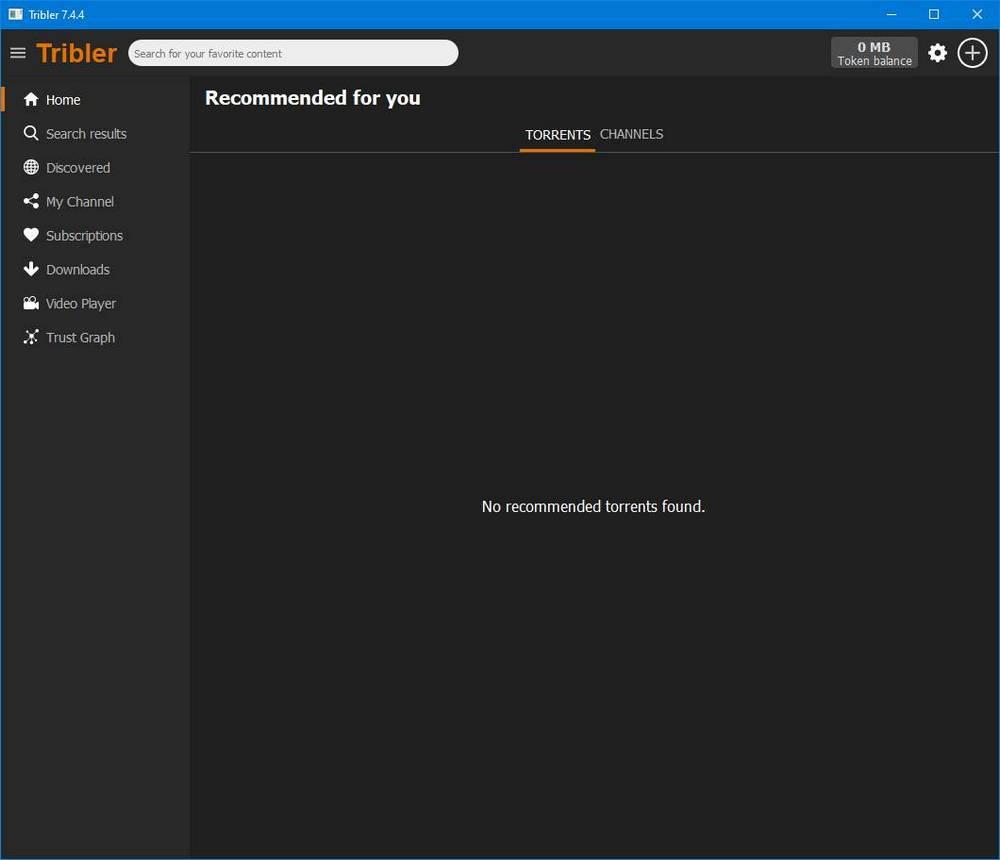
Основной интерфейс этой программы очень понятен и прост в использовании. Когда мы его выполним, мы увидим простое окно с панелью слева, где появятся различные категории программы.
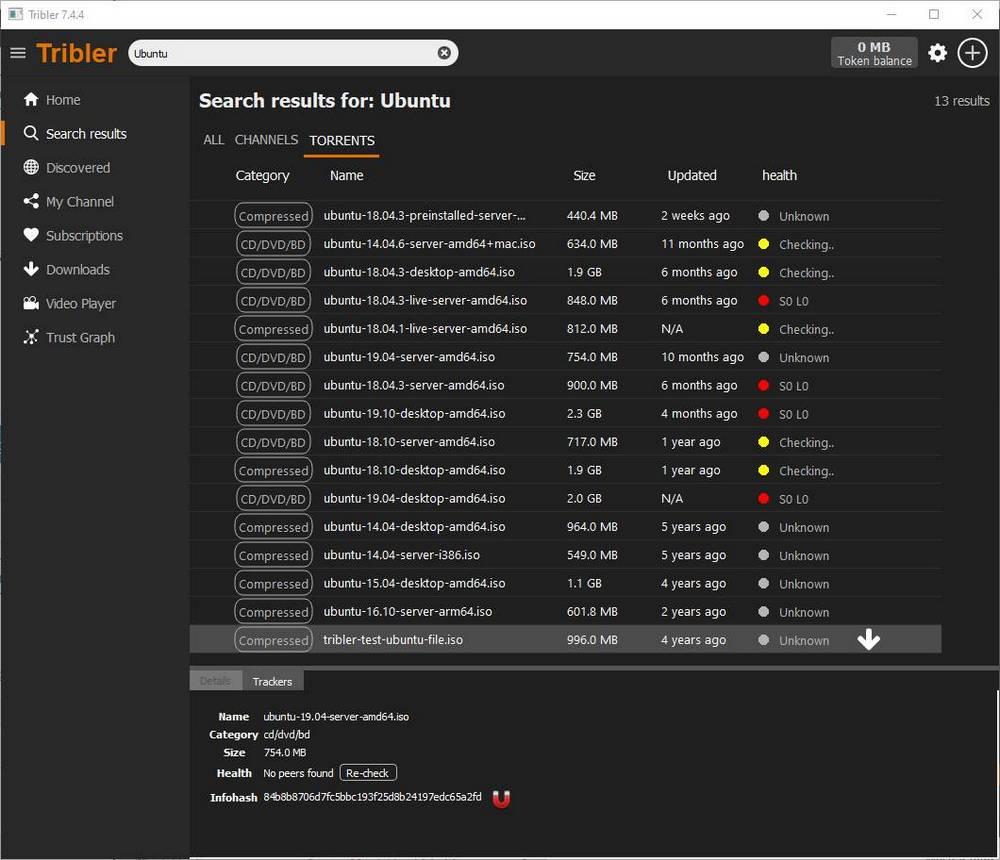
В верхней части программы мы можем написать то, что мы хотим искать из этой программы. И через несколько секунд мы можем увидеть результаты, которые программа уже нашла.
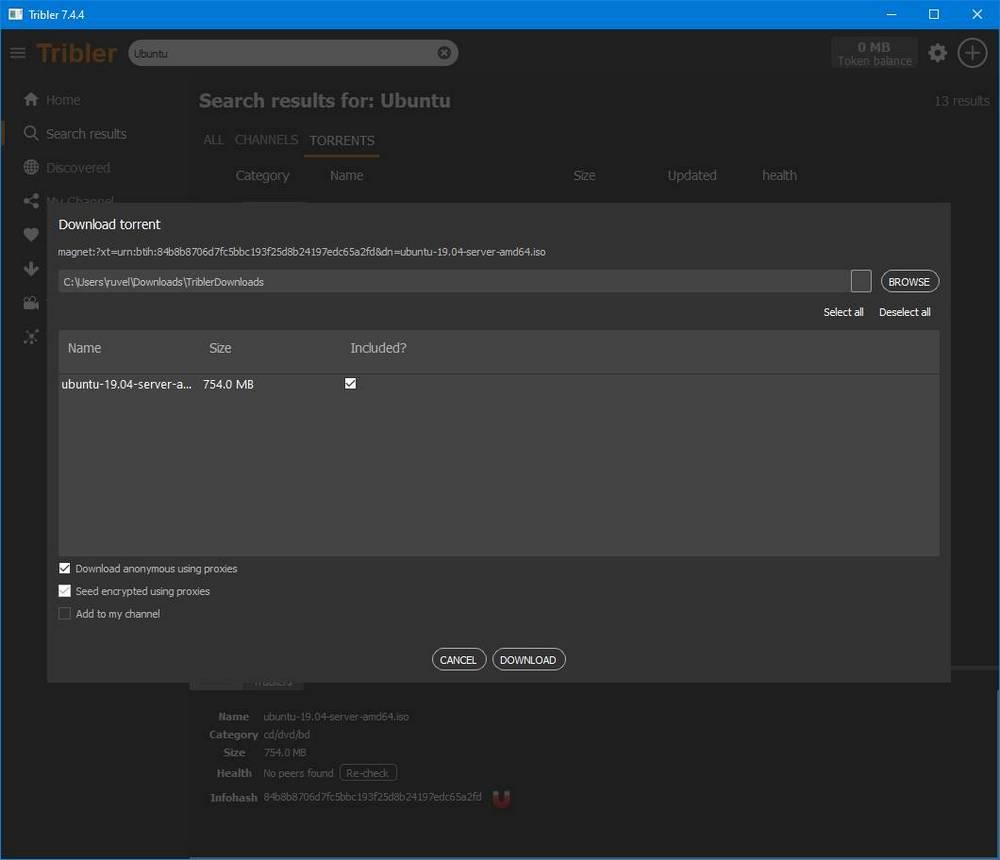
Мы можем начать загрузку выбранного файла, нажав на стрелку, которая появляется справа от его имени. Или, если мы скачали торрент-файл из Интернета, мы также можем открыть его в программе. Мы увидим итоговое окно с загрузкой и, если все правильно, мы начнем загрузку из Интернета.
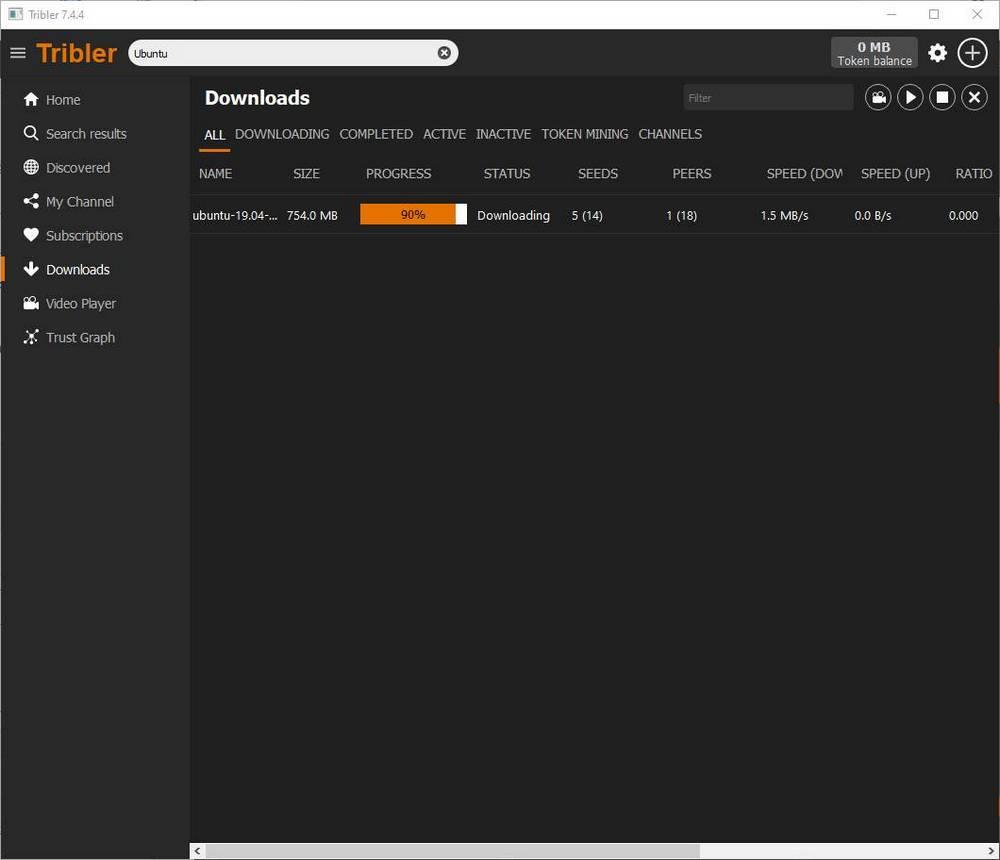
Файл будет загружен из торрент-сети, как и любой другой клиент загрузки. И когда мы закончим, мы скопируем торрент на наш компьютер.
Настроить конфиденциальность
Tribler позволяет нам уделять больше внимания скорости или анонимности. И это достигается за счет того, что пользователи могут выбирать, сколько они хотят передать данные через свою распределенную сеть.
В конфигурации программы мы находим раздел «Анонимность».
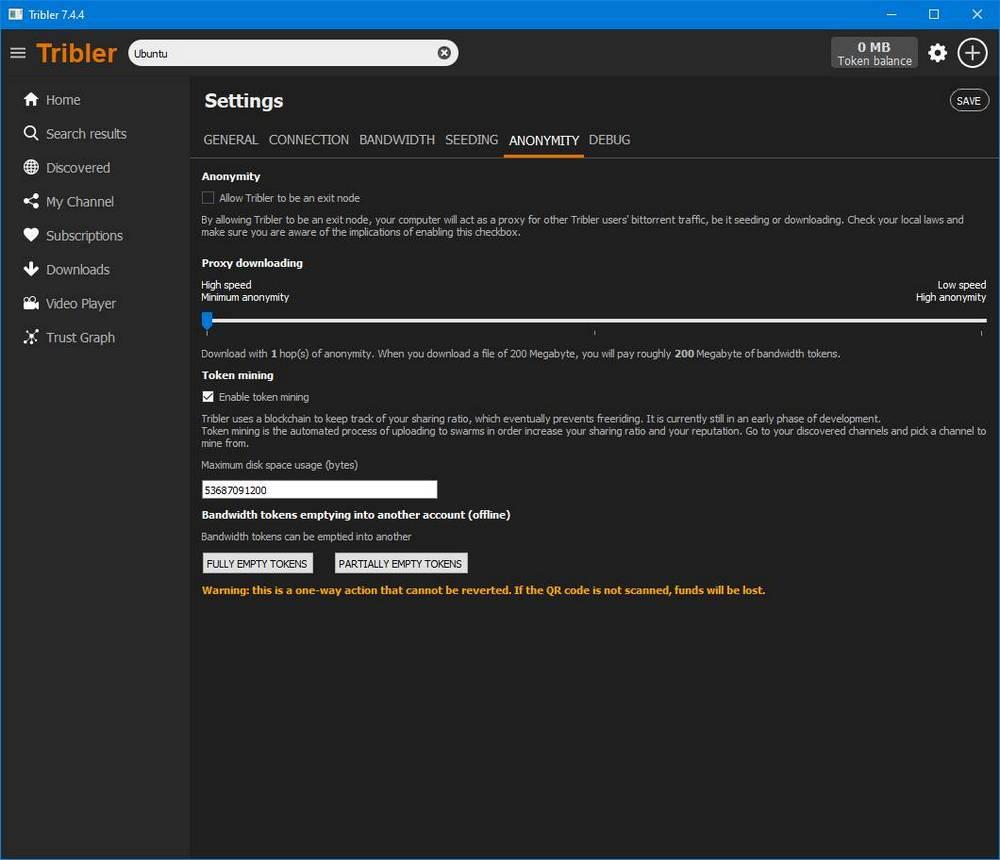
Здесь мы можем настроить несколько параметров, связанных с загрузкой конфиденциальности клиента. Например, первое, что мы увидим, позволит нам превратить наш компьютер в выходной узел Tribler, стать частью его распределенной сети и сотрудничать с целью улучшения программы.
Мы также можем установить уровень конфиденциальности, которого хотим достичь. По умолчанию, Tribler настроен на скачок анонимности. Но мы можем настроить до 3 прыжков для большей конфиденциальности, хотя скорость загрузки резко упадет.
Жетоны, чтобы помочь сообществу
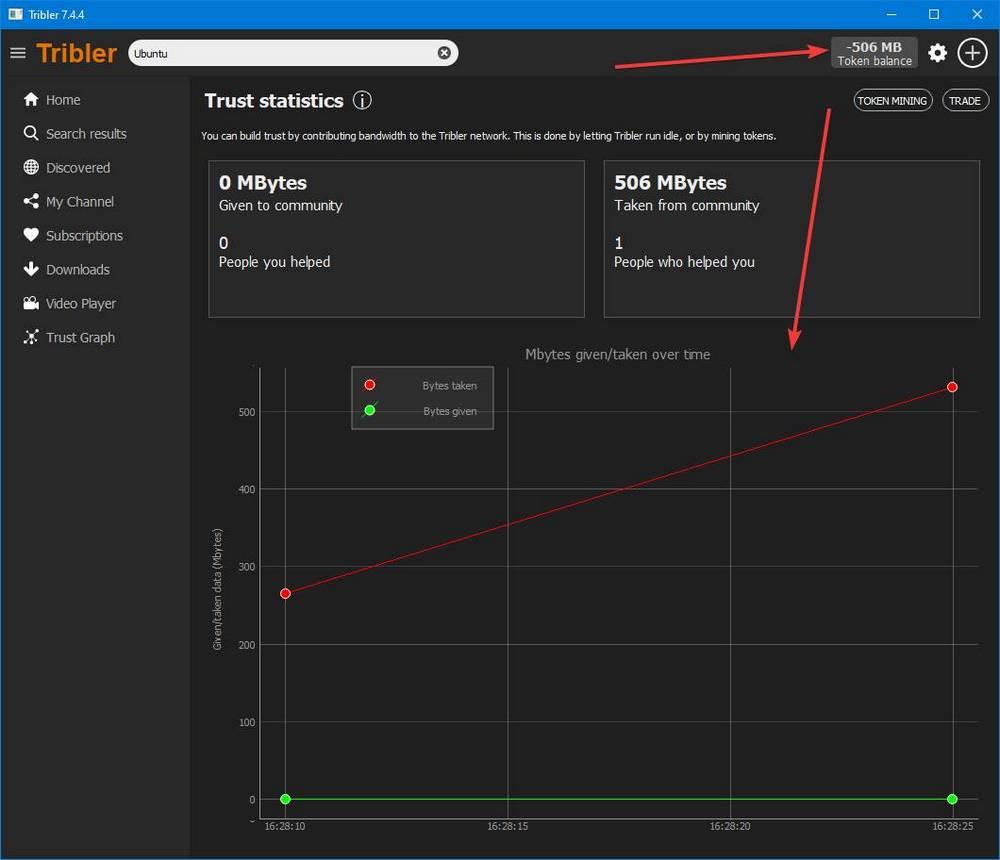
В зависимости от уровня конфиденциальности, который мы настроили, расходы на токены будут выше. Например, как минимум, загрузка 1 ГБ подразумевает расходование 1 ГБ мегабайт токенов. Однако при максимуме (3 скачка) снижение на 1 ГБ подразумевает расходование 3 ГБ токенов.
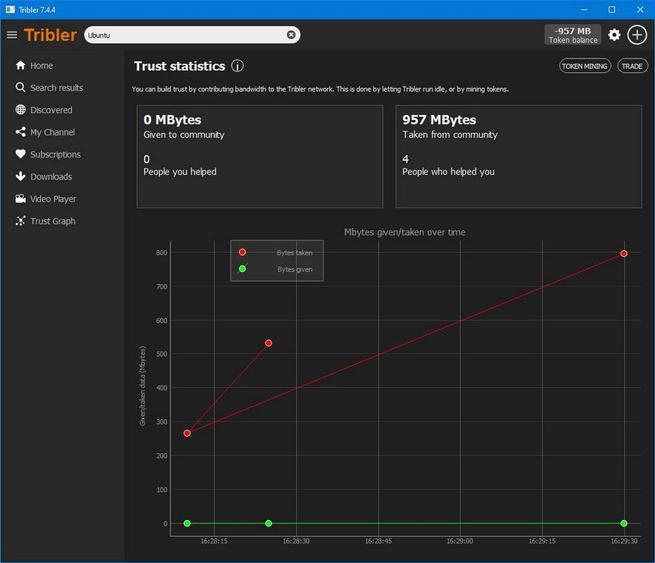
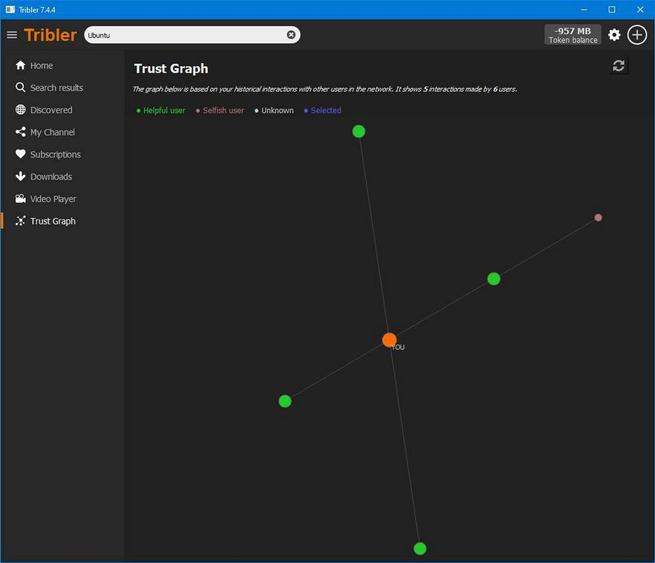
Хотя не обязательно иметь токены для загрузки из этой программы, Tribler вознаграждает тех, кто делится, более быстрыми анонимными загрузками. Чем больше будет количество токенов в мегабайтах, тем лучше мы будем снижать.
Скачать Tribler
Кроме того, как это с открытым исходным кодом У него большое сообщество, которое помогает как в разработке, так и в обслуживании и пересмотре кода этого анонимного клиента загрузки.
Downloading and Uploading
The easiest way to download using Tribler is to search from the search panel at the top of the screen. Just type in what you’re looking for and press the ENTER button. You will be taken to the Results tab and your search results will start coming in. When you’ve found what you’re looking for you can click the Download button directly or first click on the search result to examine it in detail and then click the Download button.
If you wish to upload something you have already downloaded you can just start the download for it as usual and point to the same directory where you stored the files when downloading them. Tribler will then start by checking all the data to see if it’s there. After that Tribler will try to download any missing data and will start uploading the data you already had.
In Tribler, you compensate other users for the bandwidth you use when downloading with anonymity. When uploading content to other (Tribler) users, you earn bandwidth tokens. If you accumulate more bandwidth tokens, you get preferential treatment when downloading anonymously, which results in higher download speeds.
The exact amount of bandwidth tokens you pay to others, depends on the level of anonymity. This is the number of other users, or hops, you use during a download. If you download with three hop anonymity, your encrypted data is sent through the machines of three other Tribler users. Increasing the number of hops benefits anonymity but costs you more bandwidth tokens.
For example, if you download a 1 Gigabyte video with one hop anonymity, you pay 1 Gigabyte worth of bandwidth tokens. Each additional hop increases the amount of bandwidth tokens you have to pay. When downloading the same file using three hops, you pay 3 Gigabyte of bandwidth tokens instead.
Your token balance indicates how much work you have performed for other users and how much work other users have performed for you. At this time, this work is the amount of incoming and outgoing traffic but our mechanism is open for extension (e.g., in a future release we could also reward users for storing data or performing computations). The amount of performed and consumed work are indicated as ‘given’ and ‘taken’ in the user interface respectively. Subtracting the amount of ‘taken’ bytes from the amount of ‘given’ bytes yields the bandwidth token balance.
We refer the interested reader to our recent publication (see Section 7) that further discusses our token mechanism and provides more technical details.
You can earn bandwidth tokens by simply running Tribler. When connected to other peers in the Tribler network, your Tribler instance automatically becomes eligible for relaying traffic to other users if other users download content anonymously. Relaying traffic will increase your bandwidth token balance. You will also earn bandwidth tokens by sharing channel content with other users. Channel content will be shared after subscribing to a channel. You can view which channels you are currently sharing by going to the ‘downloads’ tab and then the ‘channels’ tab.
Please take into consideration that Tribler by default downloads with one-hop anonymity. This means that an anonymous download only uses a single exit node and circuits thus do not include relay nodes. This currently raises the bar to reliably earn bandwidth tokens. We are aware of this and we are exploring to modify the default settings of anonymous downloads, making it easier for users to increase their bandwidth token balance. Naively applying this change, however, would have a negative effect on the overall download speed. As such, we only want to implement this modification once we are confident that it will not degrade the user experience of our downloading functionality.
We frequently receive reports from users that their bandwidth token balance is decreasing. When downloading anonymously, other users perform work for you since the data you are downloading is routed through one or more nodes, and encrypted. When a circuit is removed, the downloader transfers the appropriate amount of bandwidth tokens to the involved nodes in a circuit, lowering the bandwidth token balance of the downloader and increasing the token balance of the other nodes in the circuit. This is usually the main reason why your token balance is decreasing.
However, Tribler also performs other work in the background, such as downloading channels from other users and fetching health statistics of channel torrents (which includes the number of downloaders and seeders of a particular torrent). These operations also decrease your token balance since you reward the users that helped you.
Finally, we acknowledge that your token balance can decrease as the result of a software bug. Accounting the amount of work performed and consumed is part of our bigger goal to reward good behavior and to address long-term free-riding behavior (the situation where one only uses Tribler to download content without contributing anything back to the network). Designing and deploying such mechanisms is challenging and requires many iterations to get it right. With each release, we aim to improve our token mechanism and address outstanding issues. From our experience, software bugs related to the bandwidth token balance can be very subtle and sometimes requires significant time investment to understand. By carefully tracking the overall network health and the dynamics of token payouts, we aim to analyse and improve our accounting mechanism, eventually leading to a healthier and fairer network.
Administration
We take bug reports very seriously and try to investigate each of them. When Tribler encounters a crash, you will be prompted with a dialog that allows you to send additional information to us. This helps us with debugging and fixing the issue. If you have a suggestion for us or another problem, you can either create a post in our forums or create an issue on Github.
Go to the download page to download the right installer for your operating system.
For Windows users: just open the downloaded file by double clicking on it and Tribler will be installed.
Note: if you do not run a supported system (see the download page) the following steps might not work.
Just install the new version, see here for instructions on that. Tribler will automatically upgrade data from old versions when it is first started, if necessary. All your data, torrents, channels and settings will be retained.
You can limit the download or upload speed of active downloads and seeds by going into the Settings and, under the BANDWIDTH tab, setting the desired values. Note, however, that this limits the speed of active downloads and seeds, not of Tribler in its entirety. The overhead of the Tribler protocol, in particular, can’t be limited at this point.
No, you can’t. Although this feature has been requested a number of times and is available in some other clients, it is not one that is likely to appear in Tribler. The first use of the feature is to manually block certain peers. This usage scenario just asks for abusive behaviour, since actual reasons for blocking (such as freeloading) are very hard to investigate for a human being and easy to misjudge. The second usage scenario is using block lists to keep out unwanted eyes, such as governments that don’t wish to upload or download but want to spy on you. This usage, however, is not very effective and provides a false sense of security at best.
If you still wish to block lists of peers to prevent spying parties to connect to you, you can use external software such as PeerBlock that is specialised in this.
Troubleshooting
For a description of which ports to open, see below. How you open ports completely depends on the device or software you’re trying to configure, but PortForward has excellent coverage of most of them.
Note that some routers actually provide both port forwarding and a firewall. The two are not the same, but both can hinder your connection. Forwarding the ports is needed to have incoming connections to your router to be forwarded to the computer running Tribler, while allowing those incoming connections is needed to allow them in the first place.
If all of this doesn’t help you get your downloads going, you can always visit our forums for more help.
The ports Tribler uses depends on the port number configured under Settings, Connection. The default port number is 7760.
These are the ports used for incoming connections.
You are most welcome to configure a different port, but keep in mind that ports below 1024 are privileged and therefore most likely unavailable to Tribler. Choose a value higher than 1025 to be safe. Also keep in mind that each port number can be used by only one program at the same time. If you have other BitTorrent software running, for example, and want Tribler to use the same port then you will first have to close that other program completely before running Tribler or configuring Tribler’s port.
Note, in particular, that all of these apply to torrents in your own channel if you look them up from the main channels view instead of under My Channels.
Not ‘having heard’ of the torrents might be a bit vague, but has to do with the way channels are distributed. Tribler uses a gossiping protocol to communicate, something you can compare very well with real world gossiping. People (peers) meet each other (connect) and then they exchange information. Not everybody knows the latest in town (not every peer knows every torrent), but if you go around enough (exchange information with enough peers) you’ll be kept up to date (know the current state of the channel). Just like real world gossiping, where it would become a very busy mess if you’d put all the people together in a room to keep each other constantly informed, Tribler peers aren’t constantly exchanging information either. As such, gossiping, while disseminating information quite effectively, can take some time to get you the latest information.
To completely reset Tribler you can remove the settings directory in its entirety. This will completely wipe all settings and active downloads or seeds, as well as your download and upload history (and hence reset your reputation). Note that it will not remove the actual data, either partial or complete, of your downloads, just the knowledge that you were downloading them. Unless you put your downloads in the settings directory yourself, of course.
If you’re concerned about losing things nonetheless, you can also just temporarily rename the directory and start Tribler again to see what happens. If this does not give the desired results, you can restore your backed up directory again.
To find your settings directory, see below.
You can enter the %APPDATA% directory by opening an explorer, typing %APPDATA% in the address bar and then hitting Enter.
Unfortunately, there is no way to remove such content from the decentralized network.
About Tribler
Tribler is a BitTorrent peer-to-peer (P2P) client with various extensions such as integrated search and Video-on-Demand. Tribler is also a not-for-profit research group. We are supported by EU and Dutch research funding. Our aims are to further research, education and progress in peer-to-peer applications, build EU skill capacity in this important area and reach out globally for cooperation and exchange of ideas. As academics we publish our findings so anyone can follow our progress. Tribler is an open source project so anyone can participate in the development of our work and utilize it.
In short Tribler is the evolution of P2P technology building on but also going beyond the successful BitTorrent protocol.
Tribler supports anonymous downloading and seeding. Check our Anonymity page for details.
Please note that, although other Bittorrent clients support encryption, that does not make them anonymous.
Yes, you most certainly can. Check out our Github link in the Developers page. Tribler is released under an open source license, mostly LGPL, partly MIT license. See the license.txt file in the source package for details.
Supported Features
Tribler supports encryption of torrent traffic and anonymity. Check our Anonymity page for details.
There is currently no way to run Tribler in a browser. However, you can use our RESTful API, built for developers, to communicate with the Tribler core. See here for the documentation of this API.
Miscellaneous
The collected torrent files are collected while you are online. They are part of the distributed library of torrent files you search through when you search using Tribler. All Tribler peers in the network participate in that large library by exchanging torrents and keeping a part of that library available by storing it locally.
No, you are not. Tribler is a normal BitTorrent client in that it participates in Torrent swarms like any other BitTorrent client. You can download from and upload to all the other peers in that swarm. However, when seeding anonymously, only other Tribler users can download your content.
Yes, it does a lot more. Tribler peers are part of an overlay network that exchanges information about channels and torrents, among other things. This overlay network is the basis for the features Tribler offers, such as the integrated search and channels.
Could you stop it? Theoretically, yes. And if you stopped it, it would take your client a few minutes to do searches, but otherwise it would function. You would be leeching on the network, then, taking and not giving. If everybody else stops it, though, you might just as well use any plain old BitTorrent since all of Tribler’s features will break down. So yes, theoretically you could stop it, but you shouldn’t.
Imagine a large circle of users (called peers), each of whom use Tribler file sharing software. File sharing software only functions if it can communicate with other peers. File sharing software requires the Internet address of others in order to search, download and share content with others. On initial startup, the sharing software must bootstrap and find at least one other peer.
List of online peers
The most simple method of bootstrapping is using a list of currently online peers plus their port number. See the example below.
# file: bootstraptribler.txt
# default bootstrap peers
server1.always-online.org 6420
host1.never-offline.russia 6420
sealand.routed.org 6420
168.0.0.13 6420
A file sharing program needs a fresh list of peers to bootstrap. Thus a pre-defined list of peers is included in the software installer. As peers can go offline it is important that at least one peer out of possibly thousands on the list is still online. This pre-existing address list of possibly working peers must therefore remain valid for as long as possible.
Bootstrapping is done by contacting peers in the list, possibly in parallel. If a single peers replies, we are connected. Once connected, the peer requests a fresh list of working peer Internet addresses. The peer tries to connect to the nodes it was shipped with, as well as nodes it receives from other peers, until it reaches a certain quota. By default Tribler software itself has hard coded some well known online peers. Different online peers for bootstrapping can be used by creating a bootstraptribler.txt file in the format shown above.
How to run a bootstraptribler peer
Any computer with a open connection to the Internet can run a bootstraptribler peer. More volunteers will increase the robustness of the peer-to-peer overlay, i.e. if the peers hosted by various universities are unavailable, people can choose to use different peers.
Setup on Ubuntu Linux
Thank you for running a bootstrap peer
By running a bootstrap peer you are helping out the file sharing community. Thnx! For over 6 years we have been making Tribler as robust as possible. 10+ year old systems such as Gnutella are also distributed. However, all first, second and third generation file sharing software either uses central servers or offers no protection against spam plus lacks our social features and streaming. We define this as «4G P2P». It is trivial to sabotage Gnutella to the point at which it becomes useless. Several ideas have been proposed on bootstrapping systems without any online peer list, simply by smart brute force pinging?. We hope to implement these ideas from University of Denver one day and make this page obsolete, feel free to submit your code.
With a thriving community of bootstraptribler peers we as academics are trying to make something new: extreme robust systems. The Amazon cloud has occasional downtime and many websites like Facebook and Twitter had downtime over the years. That could change if more developers used our self-organising system principles.
Result: The only way to take it down is to take The Internet down.
We are proud that Tribler never had a single second of downtime in the six years since it exists. Yes, we had software bug and version upgrade issues. However, the overlay has always been alive and evolving. We still have a lot of ideas on how to improve matters. Currently we are creating more robust alternatives for all TCP-based protocols, including Bittorrent itself.