
sv_pure — чистый сервер

noBap
Участник
sv_pure — чистый сервер
Управление командой sv_pure позволяет администраторам защитить свой сервер от недобросовестных игроков, которые использую измененные текстуры, модели, звуки и материалы. Игроки на сервере не смогут пользоваться прозрачными текстурами, более громкими звуками или увеличенными и яркими моделями, что дает неоспоримое преимущество над другими пользователями. Для активации «чистого сервера» достаточно прописать в серверном конфигурационном файле server.cfg или в консоле сервера команду sv_pure 1 или 2.
Sv_pure 1
В данном случае сервер обращается к файлу pure_server_whitelist.txt, который содержит информацию о том, какие файлы и папки можно изменять, а какие нельзя. По умолчанию, почти все файлы из папок materials, sound и models должны быть оригнальными (from_steam), но тем не менее разрешает использование измененных моделей игроков и различные спреи (spray decals).
Sv_pure 2
В этом режиме сервер игнорирует содержимое файла pure_server_whitelist.txt и разрешает использовать только оригинальные файлы. Это идентично режиму sv_pure 1, где абсолютно всем папкам присвоен атрибут from_steam.
Настройка pure_server_whitelist.txt
Итак, если вы решили использовать режим sv_pure 1, то наверняка захотите отредактировать whitelist под конкретные нужды игрового сервера. На каждой строчке указывается группа файлов (папка или отдельный фаил) и атрибут, присвоеный этим файлам. Пример:
В этом примере все файлы и папки в директории materials разрешены только из Steam’a, т.е. должны быть оригинальными.
Варианты назначения группы файлов:
Производительность игрового сервера
В случае, когда сервер работает в режиме sv_pure 1 и, например, на всю папку materials присвоен атрибут allow_from_disk+check_crc, то сервер будет делать большие паузы при смене карты, так как он будет проверять каждый файл в папке materials на соответствие CRC (вычисление контрольной суммы)! Поэтому allow_from_disk+check_crc атрибут следует назначать минимальному числу файлов.
Проведение командных боев (clan war) и турниров
Проводя командные бои рекомендуется использовать на сервере sv_pure 2, так как это не только обезопасит всех игроков от нечестных пользователей, но и дает уверенность противнику в том, что ваша команда играет без нарушений.
Но тем не менее, злоумышленники нашли способ обходить команду sv_pure с помощью сторонних приложений, поэтому настоятельно рекомендуем установить на свой игровой сервер плагин zBlock, который блокирует преодоление sv_pure сторонними приложениями.
Обходим ограничения sv_pure 1 в Source играх
В данной статье мы подробно рассмотрим уязвимость, при помощи которой можно делать замену любых «защищённых» sv_pure 1 текстур.
Введение
Как известно, существуют так называемые «легальные читы», которые включают в себя модели, видимые через стены, прозрачные текстуры и т.д. Легальными данные читы называются из-за того, что за их использование игрок не может быть забанен системой VAC, поэтому они достаточно популярны среди нечестных игроков всех уровней.
Для защиты от подобного применяется штатная функция sv_pure. На большинстве серверов она установлена в значение 1, т.е. запрещено всё, кроме файлов из белого списка. Нестандартные текстуры и модели могут быть загружены на клиенте только если они расположены в каталоге из белого списка.
Белый список
Рассмотрим белый список игр Team Fortress 2 и Counter-Strike: Source по умолчанию:
Первые две строки уже сами по себе являются брешью, т.к. позволяют заменить модели игроков обеих команд на видимые через стены, поэтому большинство игровых администраторов их убирают. Нас же интересуют оставшиеся.
Описание уязвимости
Сама уязвимость заключается в том, что игра на движке Source при подключении к серверу проверяет только файлы моделей/текстур на наличие их в белом списке. Манифесты при этом можно изменять как и сколько угодно без каких-либо последствий.
Эксплуатируем уязвимость
Выполним следующие шаги строго по порядку:
Защита от уязвимости
В настоящее время единственной возможностью защититься от игроков с текстурами, видимыми через стены, можно только с помощью установки на сервере sv_pure 2. Это заблокирует любые нестандартные модели и текстуры с полной проверкой контрольных сумм.
Внимание! При использовании sv_pure 2 перестанут работать любые нестандартные звуки, модели, текстуры (если они есть на сервере), а также спреи игроков.
Уязвимость уже активно эксплуатируется игроками, т.к. существует готовый эксплойт-пак на неё. Я по понятным причинам не буду выкладывать ссылки на него здесь.
Примеры эксплуатации уязвимости
Скриншоты сделаны пользователем _w0lf на сервере с sv_pure 1 и взяты с его страницы:
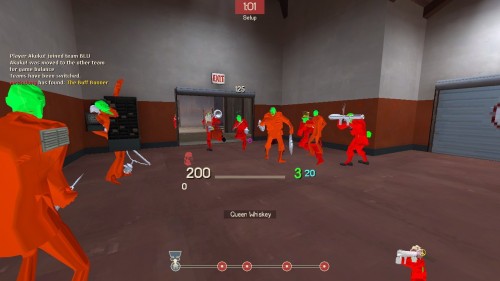 Карта pl_badwater, респаун Красных
 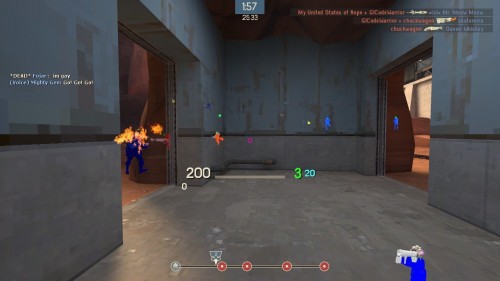 Карта pl_badwater, респаун Синих
12 комментариев к записи
То-то я смотрю у некоторых игроков на известных серверах так внезапно «вырос» скилл… Надеюсь, Valve исправят это безобразие как можно скорее.
Если я уберу строку materials\temp\… из вайтлиста это решит проблему?
Если я уберу строку materials\temp\… из вайтлиста это решит проблему?
Конечно нет. Файлы разместят в том, который на вашем сервере в белом списке. Получить белый список сервера проще простого.
Sv pure bypass что это


I used a cheat to bypass the sv_pure I think that why i got banned anyway thanks for the help
There is no way you can tell that cause the VAC ban. Using console commands, even sv_cheats or noclip on in a VAC Secured Server does not trigger a VAC Ban. I have validated this on my past servers that’s VAC secured and Steam Support.
Unless you have used an external program to force certain restricted commands for e.g., sv_cheats 1 when the server’s convar for sv_cheats is 0, then it will cause a VAC Ban.

. and that does not cause a VAC ban.
. and that does not cause a VAC ban.
. and that does not cause a VAC ban.
it did I have been playing csgo for 744 hrs and i only used it yesterday and I got banned
How can I find out what I was VAC banned for?
We do not disclose the cheats that were detected while connected to a VAC secured server that resulted in a VAC ban. We have detailed records for each VAC ban, however, releasing this information would only benefit cheat developers. The VAC team regularly investigates claims of false VAC bans to increase the effectiveness of Valve Anti-Cheat.
If a VAC ban is issued incorrectly it will be automatically removed by our servers.
it did I have been playing csgo for 744 hrs and i only used it yesterday and I got banned
How can I find out what I was VAC banned for?
We do not disclose the cheats that were detected while connected to a VAC secured server that resulted in a VAC ban. We have detailed records for each VAC ban, however, releasing this information would only benefit cheat developers. The VAC team regularly investigates claims of false VAC bans to increase the effectiveness of Valve Anti-Cheat.
If a VAC ban is issued incorrectly it will be automatically removed by our servers.

I used a cheat to bypass the sv_pure I think that why i got banned anyway thanks for the help
There is no way you can tell that cause the VAC ban. Using console commands, even sv_cheats or noclip on in a VAC Secured Server does not trigger a VAC Ban. I have validated this on my past servers that’s VAC secured and Steam Support.
Unless you have used an external program to force certain restricted commands for e.g., sv_cheats 1 when the server’s convar for sv_cheats is 0, then it will cause a VAC Ban.

it did I have been playing csgo for 744 hrs and i only used it yesterday and I got banned
VAC uses a delayed banning system. There is no official source telling you the time frame between detection of cheating infraction and application of VAC ban.
It can be days to weeks, and maybe longer. You can attach no time frame with the application of a VAC ban with what caused it.

How can I find out what I was VAC banned for?
We do not disclose the cheats that were detected while connected to a VAC secured server that resulted in a VAC ban. We have detailed records for each VAC ban, however, releasing this information would only benefit cheat developers. The VAC team regularly investigates claims of false VAC bans to increase the effectiveness of Valve Anti-Cheat.
If a VAC ban is issued incorrectly it will be automatically removed by our servers.
I used a cheat to bypass the sv_pure I think that why i got banned anyway thanks for the help
Sv pure bypass что это

Team Fortress 2


No. Deal with it, or go on community servers. There’s a reason that this was put into place.

No. Deal with it, or go on community servers. There’s a reason that this was put into place.

No. Deal with it, or go on community servers. There’s a reason that this was put into place.
fk off, you’re more useless than rocks.


No. Deal with it, or go on community servers. There’s a reason that this was put into place.

In console: Map itemtest;wait 10;disconnect
This works for some mods, mainly First person reanimations.

In console: Map itemtest;wait 10;disconnect
This works for some mods, mainly First person reanimations.
fk off, you’re more useless than rocks.
>Getting mad because someone answered your question
>Getting mad because someone answered your question
Yeah right. That’s not a answer dummy.


In console: Map itemtest;wait 10;disconnect
This works for some mods, mainly First person reanimations.
Sv pure bypass что это
Ok so maybe I will get a lot of hate from people saying it public information and shit but Im making this post anyway. Also I am terribly sorry of what I am about to post is already posted somewhere, I haven’t really looked at anything else appart from the «new sv_pure» bypass threads which were hooking a function responsible for allowing you to load custom files. The problem is that it doesn’t fix the problem with sv_pure, well yes you can load your badass looking custom chams materials but once you try to play on some official servers you get kicked and the game tells you that you have loaded third party files or something like that.
So I have used the function that was provided by those kind individuals ( so my game loads my custom materials ) with another function so I can actually use those custom files/materials and not get kicked.
Ok so lets begin:
1. First off we need to make the game actually load the custom materials
for that we need the function provided in these posts:
Fixing chams problems (sv_pure_allow_loose_file_loads)
Bypassing new third party files check
In the second post the guy even provides screenshot from IDA on what exactly he is doing and achieving with the code he gave.
I will provide screenshots in here as well ( credits to him, if it wasn’t for his signature he provided I wouldn’t have been able to show you ) this is from engine.dll On that screenshot you can see
and that is basically the function with the index 128 he mentions in his post. By hooking that function and returning a value that isn’t 2 you will completely bypass the code inside the if ( which is the idea ). You can look at the other signature he provided for client_panorama as well, in there its basically the same thing going on. In his post he uses both signatures to get return addresses ( at what address will the program go back to after executing the function ) in this case after the function with index 128 from IFIleSystem is executed it will go to the address that his signatures lead to. So he basically checks whether the function’s return address is there and if it is then he returns 0 to bypass the «== 2 » check. In the original post made by @Hec4te about this function he just returns true instead of doing what @N1x33r did in his post. Im not really sure why exactly that is because returning 1 ( true ) every time would essentially bypass the » == 2 » check, but either way I tried both ways and it seems to be working perfectly.
2. Second is to actually get the functions that checks how many third party files you have loaded and sends that information to the server. This function is: CheckFileCRCsWithServer ( https://github.com/perilouswithadoll. ient.cpp#L1844 )
as you can probably see yourself it basically does some checks like:
if m_bCheckCRCsWithServer or if a certain amount of time has passed before sending new information about your files to the server as seen from this piece of code
This function called GetUnverifiedFileHashes is responsible for returning the count of how many third party files you have loaded and that count is saved into the variable «count» as seen in the code above. So what can we do here do stop this whole function from sending data to the server about our third party files loaded into the game. Well at first I thoght: «Oh yes thats not that hard to do, I will just hook this entire function and return; every time» the problem with that however is that this function is infact not virtual, meaning its not located in the virtual method table of the class its located in. I wanted to actually detour, and even wanted to implement a detour hook myself but was told that hooking game funcs with detour might not be that great of an idea.
So then I was thinking of maybe some kind of a byte patch or something that would make it so we just return out of the functions, but I was told again that this might not be the best solution. So I stared at that function, thinking about how much I want my glow chams back ( they use a custom material ). As you can see though your files are checked using the function GetUnverifiedFileHashes, then the result is saved into a variable saving how many tp files we loaded, what would happen if we were to. make that function return a different value instead of what it actually should. And as you can see right under the call of the function there is a check if the count is equal to 0, if it is we exit the entire checkfilecrcwithserver function, which is very good. Thankfully GetUnverifiedFileHashes is actually a virtual function and we can just get its index and hook it right? Well yes but we need the index first don’t we? Well I opened up IDA and decompiled the crc function, we are left with the following:
and exit the function. By exiting the function we don’t send our tp files and therefore we don’t get kicked and voilа.
Here is the code for both of the functions: