
Операции с таблицами через Flask-SQLAlchemy
На предыдущем занятии мы с вами создали две таблицы, используя механизм SQLAlchemy, и объявили функцию-представления для регистрации новых пользователей. И теперь пришло время разобраться с чтением данных из таблиц.
Выборка записей из таблиц
Как вы помните, у нас в БД две таблицы, причем, они связаны между собой через внешний ключ user_id таблицы profiles:
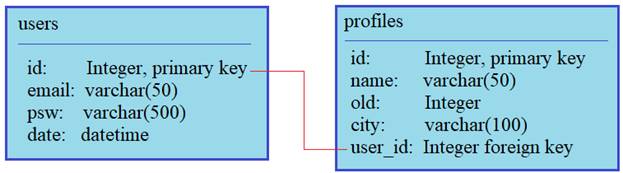
Наша задача сделать выборку по пользователям, в которой бы фигурировали данные из обеих таблиц. Но для начала посмотрим, как вообще осуществляется получение данных. Для демонстрации я перейду в консоль Python и выполню команду:
то есть, из нашего текущего модуля app импортируем переменную db и классы Users, Profiles. Далее, чтобы выбрать все записи, например, из таблицы users, следует выполнить метод all объекта query:
и на выходе получим список объектов, которые отображаются в соответствии с определением магического метода __repr__ в классе Users:
Здесь объект query берется из базового класса db.Model, от которого образованы классы Users и Profiles. Благодаря концепции наследования в ООП, мы автоматически получаем полный функционал для работы с таблицами БД.
Давайте теперь сохраним возвращаемый список в переменной res:
и посмотрим на ее содержимое. Мы видим, что это коллекция объектов и каждый объект содержит атрибуты: id, email, psw, date. Как раз те, что мы определяли в классе Users и те, что были прочитаны из соответствующей таблицы БД. То есть, мы можем обратиться к любому элементу и вывести нужное нам свойство, например, так:
Получим email из первой записи.
По аналогии работает метод first, только он возвращает первую запись, соответствующего запроса (или значение None, если ничего нет):
Далее, для выбора записей по определенному критерию можно воспользоваться методы filter_by и filter:
Разница между этими методами в том, что в filter_by передаются именованные параметры, а в filter прописывается логическое выражение. Поэтому последний метод обладает большей гибкостью, например, можно вывести все записи с id>1:
Также можно делать ограничение на максимальное число возвращаемых записей:
Выполнять сортировку по определенному полю:
Или, просто получать пользователя по значению первичного ключа:
Разумеется, все эти методы можно комбинировать и создавать более сложные запросы.
Выборка из нескольких таблиц
Ну хорошо, мы увидели как можно выбирать записи из одной конкретной таблицы. Но как объединить данные, например, из двух наших таблиц и сформировать одну общую выборку? Для этого нужно соединить записи таблиц по внешнему ключу user_id, следующим образом:
Здесь вначале в методе query указываются таблицы, формирующие выборку. Затем, используется метод join, в котором прописывается условие связывания записей этих двух таблиц. И в конце, метод all возвращает все записи, удовлетворяющие запросу.
На выходе переменная res будет ссылаться на список, содержащий выбранные данные. К ним можно обратиться, используя следующую конструкцию:
Однако, SQLAlchemy предоставляет нам еще один довольно удобный механизм связывания таблиц. Если мы наперед знаем, что необходимо выбирать для каждого пользователя информацию из таблиц users и profiles, то в классе Users, как таблицы с «первичными данными», к которой подбираются соответствующие записи из «вторичной таблицы» profiles, можно прописать специальную переменную:
Через эту переменную будет устанавливаться связь с таблицей Profiles по внешнему ключу user_id. Параметр backref указывает таблицу, к которой присоединять записи из таблицы profiles. Последнее значение uselist=False указывает, что одной записи из users должна соответствовать одна запись из profiles, что, в общем-то, и должно быть.
Теперь, выполняя простую команду:
в объектах списка будет присутствовать атрибут pr, который ссылается на объект Profiles с соответствующими данными:
Как видите, все довольно удобно. Мы воспользуемся этим механизмом и отобразим на главной странице сайта список зарегистрированных пользователей:
И модифицируем шаблон:
Все, теперь на главной странице видим информацию о пользователях из обеих таблиц.
Заключение
На этом мы завершим серию занятий по микрофреймворку Flask. Конечно, коснуться всех деталей в рамках видеоуроков просто нереально. В частности, модуль SQLAlchemy нами был рассмотрен лишь обзорно, чтобы дать основные представления об этом весьма полезном расширении, которое повсеместно используется при работе с БД. И, если вы задумали создать сайт на Flask, то обязательно используйте его (или какой-либо подобный) для работы с таблицами БД. Это избавит вас в будущем от большого количества проблем, и, кроме того, при трудоустройстве по этому профилю знание SQLAlchemy будет весьма кстати. Хорошей отправной точкой в его изучении будет страница документации на русском языке:
Видео по теме

Flask #1: Что это такое? Простое WSGI-приложение

Flask #2: Использование шаблонов страниц сайта

Flask #3: Контекст приложения и контекст запроса

Flask #4: Функция url_for и переменные URL-адреса

Flask #5: Подключение внешних ресурсов и работа с формами


Flask #7: Декоратор errorhandler, функции redirect и abort

Flask #8: Создание БД, установление и разрыв соединения при запросах

Flask #9: Добавление и отображение статей из БД

Flask #10: Способ представления полноценных HTML-страниц на сервере

Flask #11: Формирование ответа сервера, декораторы перехвата запроса

Flask #12: Порядок работы с cookies (куками)

Flask #13: Порядок работы с сессиями (session)

Flask #14: Регистрация пользователей и шифрование паролей

Flask #15: Авторизация пользователей на сайте через Flask-Login

Flask #16: Улучшение процесса авторизации (Flask-Login)

Flask #17: Загрузка файлов на сервер и сохранение в БД

Flask #18: Применение WTForms для работы с формами сайта

Flask #19: Обработка ошибок во Flask-WTF


Flask #23: Операции с таблицами через Flask-SQLAlchemy
© 2021 Частичное или полное копирование информации с данного сайта для распространения на других ресурсах, в том числе и бумажных, строго запрещено. Все тексты и изображения являются собственностью сайта
SQLAlchemy 1.4 Documentation
SQLAlchemy 1.4 Documentation
SQLAlchemy ORM
Project Versions
Linking Relationships with Backref
In fact, the relationship.backref keyword is only a common shortcut for placing a second relationship() onto the Address mapping, including the establishment of an event listener on both sides which will mirror attribute operations in both directions. The above configuration is equivalent to:
However, once the Address is appended to the u1.addresses collection, both the collection and the scalar attribute have been populated:
Remember, when the relationship.backref keyword is used on a single relationship, it’s exactly the same as if the above two relationships were created individually using relationship.back_populates on each.
Backref Arguments
We can observe, by inspecting the resulting property, that both sides of the relationship have this join condition applied:
Setting cascade for backrefs
A key behavior that occurs in the 1.x series of SQLAlchemy regarding backrefs is that cascades will occur bidirectionally by default. This basically means, if one starts with an User object that’s been persisted in the Session :
However, if we instead created a new Address object, and associated the User object with the Address as follows:
Since this behavior has been identified as counter-intuitive to most people, it can be disabled by setting relationship.cascade_backrefs to False, as in:
See the example in Controlling Cascade on Backrefs for further information.
One Way Backrefs
flambé! the dragon and The Alchemist image designs created and generously donated by Rotem Yaari.
SQLAlchemy 1.4 Documentation
SQLAlchemy 1.4 Documentation
SQLAlchemy ORM
Project Versions
Basic Relationship Patterns
A quick walkthrough of the basic relational patterns.
The imports used for each of the following sections is as follows:
One To Many
A one to many relationship places a foreign key on the child table referencing the parent. relationship() is then specified on the parent, as referencing a collection of items represented by the child:
To establish a bidirectional relationship in one-to-many, where the “reverse” side is a many to one, specify an additional relationship() and connect the two using the relationship.back_populates parameter:
Child will get a parent attribute with many-to-one semantics.
Alternatively, the relationship.backref option may be used on a single relationship() instead of using relationship.back_populates :
Configuring Delete Behavior for One to Many
Many To One
Many to one places a foreign key in the parent table referencing the child. relationship() is declared on the parent, where a new scalar-holding attribute will be created:
Bidirectional behavior is achieved by adding a second relationship() and applying the relationship.back_populates parameter in both directions:
One To One
One To One is essentially a bidirectional relationship with a scalar attribute on both sides. Within the ORM, “one-to-one” is considered as a convention where the ORM expects that only one related row will exist for any parent row.
The “one-to-one” convention is achieved by applying a value of False to the relationship.uselist parameter of the relationship() construct, or in some cases the backref() construct, applying it on the “one-to-many” or “collection” side of a relationship.
In the example below we present a bidirectional relationship that includes both one-to-many ( Parent.children ) and a many-to-one ( Child.parent ) relationships:
Above, Parent.children is the “one-to-many” side referring to a collection, and Child.parent is the “many-to-one” side referring to a single object. To convert this to “one-to-one”, the “one-to-many” or “collection” side is converted into a scalar relationship using the uselist=False flag, renaming Parent.children to Parent.child for clarity:
Above, when we load a Parent object, the Parent.child attribute will refer to a single Child object rather than a collection. If we replace the value of Parent.child with a new Child object, the ORM’s unit of work process will replace the previous Child row with the new one, setting the previous child.parent_id column to NULL by default unless there are specific cascade behaviors set up.
As mentioned previously, the ORM considers the “one-to-one” pattern as a convention, where it makes the assumption that when it loads the Parent.child attribute on a Parent object, it will get only one row back. If more than one row is returned, the ORM will emit a warning.
However, the Child.parent side of the above relationship remains as a “many-to-one” relationship and is unchanged, and there is no intrinsic system within the ORM itself that prevents more than one Child object to be created against the same Parent during persistence. Instead, techniques such as unique constraints may be used in the actual database schema to enforce this arrangement, where a unique constraint on the Child.parent_id column would ensure that only one Child row may refer to a particular Parent row at a time.
In the case where the relationship.backref parameter is used to define the “one-to-many” side, this can be converted to the “one-to-one” convention using the backref() function which allows the relationship generated by the relationship.backref parameter to receive custom parameters, in this case the uselist parameter:
Many To Many
The “association table” above has foreign key constraints established that refer to the two entity tables on either side of the relationship. The data type of each of association.left_id and association.right_id is normally inferred from that of the referenced table and may be omitted. It is also recommended, though not in any way required by SQLAlchemy, that the columns which refer to the two entity tables are established within either a unique constraint or more commonly as the primary key constraint; this ensures that duplicate rows won’t be persisted within the table regardless of issues on the application side:
The relationship.secondary argument of relationship() also accepts a callable that returns the ultimate argument, which is evaluated only when mappers are first used. Using this, we can define the association_table at a later point, as long as it’s available to the callable after all module initialization is complete:
With the declarative extension in use, the traditional “string name of the table” is accepted as well, matching the name of the table as stored in Base.metadata.tables :
When passed as a Python-evaluable string, the relationship.secondary argument is interpreted using Python’s eval() function. DO NOT PASS UNTRUSTED INPUT TO THIS STRING. See Evaluation of relationship arguments for details on declarative evaluation of relationship() arguments.
Deleting Rows from the Many to Many Table
A behavior which is unique to the relationship.secondary argument to relationship() is that the Table which is specified here is automatically subject to INSERT and DELETE statements, as objects are added or removed from the collection. There is no need to delete from this table manually. The act of removing a record from the collection will have the effect of the row being deleted on flush:
A question which often arises is how the row in the “secondary” table can be deleted when the child object is handed directly to Session.delete() :
There are several possibilities here:
A higher performing option here is to use ON DELETE CASCADE directives with the foreign keys used by the database. Assuming the database supports this feature, the database itself can be made to automatically delete rows in the “secondary” table as referencing rows in “child” are deleted. SQLAlchemy can be instructed to forego actively loading in the Child.parents collection in this case using the relationship.passive_deletes directive on relationship() ; see Using foreign key ON DELETE cascade with ORM relationships for more details on this.
Association Object
As always, the bidirectional version makes use of relationship.back_populates or relationship.backref :
Working with the association pattern in its direct form requires that child objects are associated with an association instance before being appended to the parent; similarly, access from parent to child goes through the association object:
To enhance the association object pattern such that direct access to the Association object is optional, SQLAlchemy provides the Association Proxy extension. This extension allows the configuration of attributes which will access two “hops” with a single access, one “hop” to the associated object, and a second to a target attribute.
The association object pattern does not coordinate changes with a separate relationship that maps the association table as “secondary”.
Below, changes made to Parent.children will not be coordinated with changes made to Parent.child_associations or Child.parent_associations in Python; while all of these relationships will continue to function normally by themselves, changes on one will not show up in another until the Session is expired, which normally occurs automatically after Session.commit() :
Additionally, just as changes to one relationship aren’t reflected in the others automatically, writing the same data to both relationships will cause conflicting INSERT or DELETE statements as well, such as below where we establish the same relationship between a Parent and Child object twice:
Late-Evaluation of Relationship Arguments
Many of the examples in the preceding sections illustrate mappings where the various relationship() constructs refer to their target classes using a string name, rather than the class itself:
These string names are resolved into classes in the mapper resolution stage, which is an internal process that occurs typically after all mappings have been defined and is normally triggered by the first usage of the mappings themselves. The registry object is the container in which these names are stored and resolved to the mapped classes they refer towards.
As the Python eval() function is used to interpret the late-evaluated string arguments passed to relationship() mapper configuration construct, these arguments should not be repurposed such that they would receive untrusted user input; eval() is not secure against untrusted user input.
The full namespace available within this evaluation includes all classes mapped for this declarative base, as well as the contents of the sqlalchemy package, including expression functions like desc() and sqlalchemy.sql.functions.func :
For the case where more than one module contains a class of the same name, string class names can also be specified as module-qualified paths within any of these string expressions:
The relationship() construct also accepts Python functions or lambdas as input for these arguments. This has the advantage of providing more compile-time safety and better support for IDEs and PEP 484 scenarios.
A Python functional approach might look like the following:
The full list of parameters which accept Python functions/lambdas or strings that will be passed to eval() are:
Changed in version 1.3.16: Prior to SQLAlchemy 1.3.16, the main relationship.argument to relationship() was also evaluated through eval() As of 1.3.16 the string name is resolved from the class resolver directly without supporting custom Python expressions.
As stated previously, the above parameters to relationship() are evaluated as Python code expressions using eval(). DO NOT PASS UNTRUSTED INPUT TO THESE ARGUMENTS.
Late-Evaluation for a many-to-many relationship
flambé! the dragon and The Alchemist image designs created and generously donated by Rotem Yaari.
SQLAlchemy 1.4 Documentation
SQLAlchemy 1.4 Documentation
SQLAlchemy ORM
Project Versions
Relationships API
Construct a dynamically-loading mapper property.
Annotate a portion of a primaryjoin expression with a ‘foreign’ annotation.
Provide a relationship between two mapped classes.
Annotate a portion of a primaryjoin expression with a ‘remote’ annotation.
Provide a relationship between two mapped classes.
Some arguments accepted by relationship() optionally accept a callable function, which when called produces the desired value. The callable is invoked by the parent Mapper at “mapper initialization” time, which happens only when mappers are first used, and is assumed to be after all mappings have been constructed. This can be used to resolve order-of-declaration and other dependency issues, such as if Child is declared below Parent in the same file:
argument¶ –
A mapped class, or actual Mapper instance, representing the target of the relationship.
relationship.argument may also be passed as a callable function which is evaluated at mapper initialization time, and may be passed as a string name when using Declarative.
Prior to SQLAlchemy 1.3.16, this value is interpreted using Python’s eval() function. DO NOT PASS UNTRUSTED INPUT TO THIS STRING. See Evaluation of relationship arguments for details on declarative evaluation of relationship() arguments.
secondary¶ –
When passed as a Python-evaluable string, the argument is interpreted using Python’s eval() function. DO NOT PASS UNTRUSTED INPUT TO THIS STRING. See Evaluation of relationship arguments for details on declarative evaluation of relationship() arguments.
The relationship.secondary keyword argument is typically applied in the case where the intermediary Table is not otherwise expressed in any direct class mapping. If the “secondary” table is also explicitly mapped elsewhere (e.g. as in Association Object ), one should consider applying the relationship.viewonly flag so that this relationship() is not used for persistence operations which may conflict with those of the association object pattern.
New in version 0.9.2: relationship.secondary works more effectively when referring to a Join instance.
backref¶ –
Indicates the string name of a property to be placed on the related mapper’s class that will handle this relationship in the other direction. The other property will be created automatically when the mappers are configured. Can also be passed as a backref() object to control the configuration of the new relationship.
back_populates¶ –
overlaps¶ –
A string name or comma-delimited set of names of other relationships on either this mapper, a descendant mapper, or a target mapper with which this relationship may write to the same foreign keys upon persistence. The only effect this has is to eliminate the warning that this relationship will conflict with another upon persistence. This is used for such relationships that are truly capable of conflicting with each other on write, but the application will ensure that no such conflicts occur.
bake_queries=True¶ –
Enable lambda caching for loader strategies, if applicable, which adds a performance gain to the construction of SQL constructs used by loader strategies, in addition to the usual SQL statement caching used throughout SQLAlchemy. This parameter currently applies only to the “lazy” and “selectin” loader strategies. There is generally no reason to set this parameter to False.
Changed in version 1.4: Relationship loaders no longer use the previous “baked query” system of query caching. The “lazy” and “selectin” loaders make use of the “lambda cache” system for the construction of SQL constructs, as well as the usual SQL caching system that is throughout SQLAlchemy as of the 1.4 series.
cascade¶ –
cascade_backrefs=True¶ –
Deprecated since version 1.4: The relationship.cascade_backrefs flag will default to False in all cases in SQLAlchemy 2.0.
collection_class¶ –
A class or callable that returns a new list-holding object. will be used in place of a plain list for storing elements.
comparator_factory¶ –
A class which extends Comparator which provides custom SQL clause generation for comparison operations.
distinct_target_key=None¶ –
It may be desirable to set this flag to False when the DISTINCT is reducing performance of the innermost subquery beyond that of what duplicate innermost rows may be causing.
doc¶ – Docstring which will be applied to the resulting descriptor.
foreign_keys¶ –
There is more than one way to construct a join from the local table to the remote table, as there are multiple foreign key references present. Setting foreign_keys will limit the relationship() to consider just those columns specified here as “foreign”.
The Table being mapped does not actually have ForeignKey or ForeignKeyConstraint constructs present, often because the table was reflected from a database that does not support foreign key reflection (MySQL MyISAM).
The relationship.primaryjoin argument is used to construct a non-standard join condition, which makes use of columns or expressions that do not normally refer to their “parent” column, such as a join condition expressed by a complex comparison using a SQL function.
The relationship() construct will raise informative error messages that suggest the use of the relationship.foreign_keys parameter when presented with an ambiguous condition. In typical cases, if relationship() doesn’t raise any exceptions, the relationship.foreign_keys parameter is usually not needed.
relationship.foreign_keys may also be passed as a callable function which is evaluated at mapper initialization time, and may be passed as a Python-evaluable string when using Declarative.
When passed as a Python-evaluable string, the argument is interpreted using Python’s eval() function. DO NOT PASS UNTRUSTED INPUT TO THIS STRING. See Evaluation of relationship arguments for details on declarative evaluation of relationship() arguments.
info¶ – Optional data dictionary which will be populated into the MapperProperty.info attribute of this object.
innerjoin=False¶ –
This flag can be set to True when the relationship references an object via many-to-one using local foreign keys that are not nullable, or when the reference is one-to-one or a collection that is guaranteed to have one or at least one entry.
join_depth¶ –
lazy=’select’¶ –
load_on_pending=False¶ –
Indicates loading behavior for transient or pending parent objects.
order_by¶ –
Indicates the ordering that should be applied when loading these items. relationship.order_by is expected to refer to one of the Column objects to which the target class is mapped, or the attribute itself bound to the target class which refers to the column.
relationship.order_by may also be passed as a callable function which is evaluated at mapper initialization time, and may be passed as a Python-evaluable string when using Declarative.
When passed as a Python-evaluable string, the argument is interpreted using Python’s eval() function. DO NOT PASS UNTRUSTED INPUT TO THIS STRING. See Evaluation of relationship arguments for details on declarative evaluation of relationship() arguments.
passive_deletes=False¶ –
Indicates loading behavior during delete operations.
A value of True indicates that unloaded child items should not be loaded during a delete operation on the parent. Normally, when a parent item is deleted, all child items are loaded so that they can either be marked as deleted, or have their foreign key to the parent set to NULL. Marking this flag as True usually implies an ON DELETE rule is in place which will handle updating/deleting child rows on the database side.
Additionally, setting the flag to the string value ‘all’ will disable the “nulling out” of the child foreign keys, when the parent object is deleted and there is no delete or delete-orphan cascade enabled. This is typically used when a triggering or error raise scenario is in place on the database side. Note that the foreign key attributes on in-session child objects will not be changed after a flush occurs so this is a very special use-case setting. Additionally, the “nulling out” will still occur if the child object is de-associated with the parent.
passive_updates=True¶ –
Indicates the persistence behavior to take when a referenced primary key value changes in place, indicating that the referencing foreign key columns will also need their value changed.
When True, it is assumed that ON UPDATE CASCADE is configured on the foreign key in the database, and that the database will handle propagation of an UPDATE from a source column to dependent rows. When False, the SQLAlchemy relationship() construct will attempt to emit its own UPDATE statements to modify related targets. However note that SQLAlchemy cannot emit an UPDATE for more than one level of cascade. Also, setting this flag to False is not compatible in the case where the database is in fact enforcing referential integrity, unless those constraints are explicitly “deferred”, if the target backend supports it.
It is highly advised that an application which is employing mutable primary keys keeps passive_updates set to True, and instead uses the referential integrity features of the database itself in order to handle the change efficiently and fully.
post_update¶ –
This indicates that the relationship should be handled by a second UPDATE statement after an INSERT or before a DELETE. Currently, it also will issue an UPDATE after the instance was UPDATEd as well, although this technically should be improved. This flag is used to handle saving bi-directional dependencies between two individual rows (i.e. each row references the other), where it would otherwise be impossible to INSERT or DELETE both rows fully since one row exists before the other. Use this flag when a particular mapping arrangement will incur two rows that are dependent on each other, such as a table that has a one-to-many relationship to a set of child rows, and also has a column that references a single child row within that list (i.e. both tables contain a foreign key to each other). If a flush operation returns an error that a “cyclical dependency” was detected, this is a cue that you might want to use relationship.post_update to “break” the cycle.
primaryjoin¶ –
A SQL expression that will be used as the primary join of the child object against the parent object, or in a many-to-many relationship the join of the parent object to the association table. By default, this value is computed based on the foreign key relationships of the parent and child tables (or association table).
relationship.primaryjoin may also be passed as a callable function which is evaluated at mapper initialization time, and may be passed as a Python-evaluable string when using Declarative.
When passed as a Python-evaluable string, the argument is interpreted using Python’s eval() function. DO NOT PASS UNTRUSTED INPUT TO THIS STRING. See Evaluation of relationship arguments for details on declarative evaluation of relationship() arguments.
remote_side¶ –
Used for self-referential relationships, indicates the column or list of columns that form the “remote side” of the relationship.
relationship.remote_side may also be passed as a callable function which is evaluated at mapper initialization time, and may be passed as a Python-evaluable string when using Declarative.
When passed as a Python-evaluable string, the argument is interpreted using Python’s eval() function. DO NOT PASS UNTRUSTED INPUT TO THIS STRING. See Evaluation of relationship arguments for details on declarative evaluation of relationship() arguments.
query_class¶ –
A Query subclass that will be used internally by the AppenderQuery returned by a “dynamic” relationship, that is, a relationship that specifies lazy=»dynamic» or was otherwise constructed using the dynamic_loader() function.
secondaryjoin¶ –
A SQL expression that will be used as the join of an association table to the child object. By default, this value is computed based on the foreign key relationships of the association and child tables.
relationship.secondaryjoin may also be passed as a callable function which is evaluated at mapper initialization time, and may be passed as a Python-evaluable string when using Declarative.
When passed as a Python-evaluable string, the argument is interpreted using Python’s eval() function. DO NOT PASS UNTRUSTED INPUT TO THIS STRING. See Evaluation of relationship arguments for details on declarative evaluation of relationship() arguments.
single_parent¶ –
When True, installs a validator which will prevent objects from being associated with more than one parent at a time. This is used for many-to-one or many-to-many relationships that should be treated either as one-to-one or one-to-many. Its usage is optional, except for relationship() constructs which are many-to-one or many-to-many and also specify the delete-orphan cascade option. The relationship() construct itself will raise an error instructing when this option is required.
uselist¶ –
The relationship.uselist flag is also available on an existing relationship() construct as a read-only attribute, which can be used to determine if this relationship() deals with collections or scalar attributes:
viewonly=False¶ –
When using the relationship.viewonly flag in conjunction with backrefs, the originating relationship for a particular state change will not produce state changes within the viewonly relationship. This is the behavior implied by relationship.sync_backref being set to False.
sync_backref¶ –
New in version 1.3.17.
omit_join¶ –
Allows manual control over the “selectin” automatic join optimization. Set to False to disable the “omit join” feature added in SQLAlchemy 1.3; or leave as None to leave automatic optimization in place.
Changed in version 1.3.11: setting omit_join to True will now emit a warning as this was not the intended use of this flag.
Used with the backref keyword argument to relationship() in place of a string argument, e.g.:
Construct a dynamically-loading mapper property.
This is essentially the same as using the lazy=’dynamic’ argument with relationship() :
See the section Dynamic Relationship Loaders for more details on dynamic loading.
function sqlalchemy.orm. foreign ( expr ) 
Annotate a portion of a primaryjoin expression with a ‘foreign’ annotation.
See the section Creating Custom Foreign Conditions for a description of use.
Annotate a portion of a primaryjoin expression with a ‘remote’ annotation.
See the section Creating Custom Foreign Conditions for a description of use.
flambé! the dragon and The Alchemist image designs created and generously donated by Rotem Yaari.
Created using Sphinx 4.2.0.
SQLAlchemy Sponsors
Website content copyright © by SQLAlchemy authors and contributors. SQLAlchemy and its documentation are licensed under the MIT license.
SQLAlchemy is a trademark of Michael Bayer. mike(&)zzzcomputing.com All rights reserved.
Website generation by zeekofile, with huge thanks to the Blogofile project.