
What is Spotify Uri code & How to get it?
Spotify is very well, the most popular music streaming app among young users. Spotify users surely like to share a lot of songs among their friends, who have similar musical tastes. But lets say you want to share a song on a webpage on just on Facebook or Instagram but don’t want to post a link just an image, you can do that with Spotify URI and Spotify code generator.
What is Spotify Uri?
A URI can be defined as a Uniform Resource Identifier which is a sequence of different characters that identify a media file or a certain type of logical or physical resource. URI in Spotify refers to a similar type of identifier or an indicator which is an identifier used to identify albums, songs, podcasts and artist’s profile.
The URI in Spotify is a very useful feature because this can be included in websites and apps and clicking on it, will directly open the Spotify App on your device, rather than visiting Spotify.com through your browser.
How to get Spotify URI?
The URI code of any album or artist or podcast is very easy to get on Spotify. Just follow the steps given below for all the devices –
Get Spotify URI on Desktop
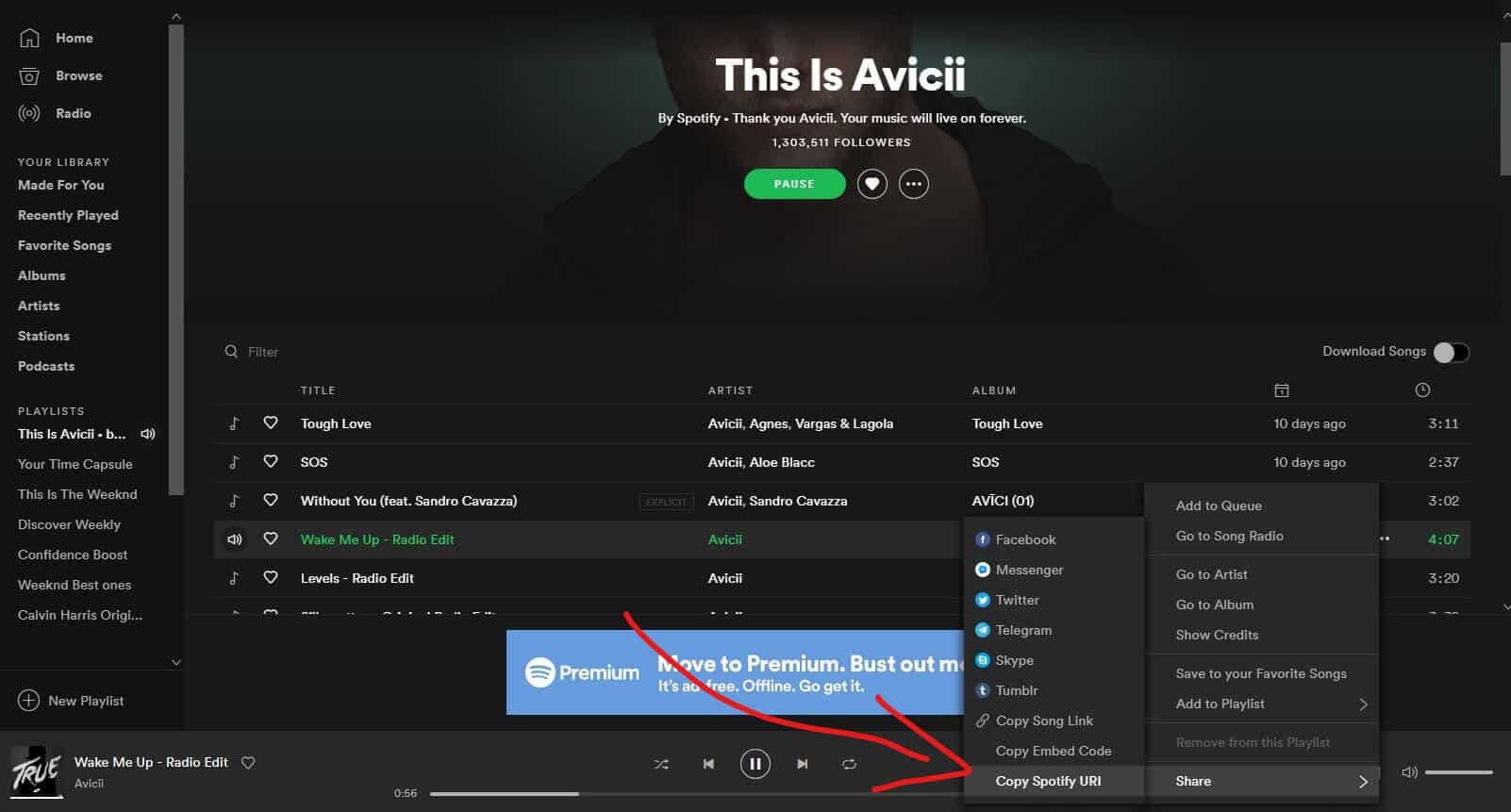
Here You Can Find Spotify URI Code on The Desktop App
And there you have it your URI which you can share or which you can use to generate a Spotify Code. If you are looking to share an album or song with your friends then I would suggest you use the normal shareable link option, as not all people are technically sound and might not be able to use it.
How to get Spotify uri on mobile?
Unfortunately, you cannot copy Spotify URI codes yet from the mobile app but you can get normal shareable URLs. Here’s how you can a link to share –
How to use Spotify Uri?
Depending on who you are there are several use cases for Spotify URI. Some of them are like –
You can easily head over to Spotifycodes.com and enter your preferred URI of your favourite artist or album and then generate your Spotify code.
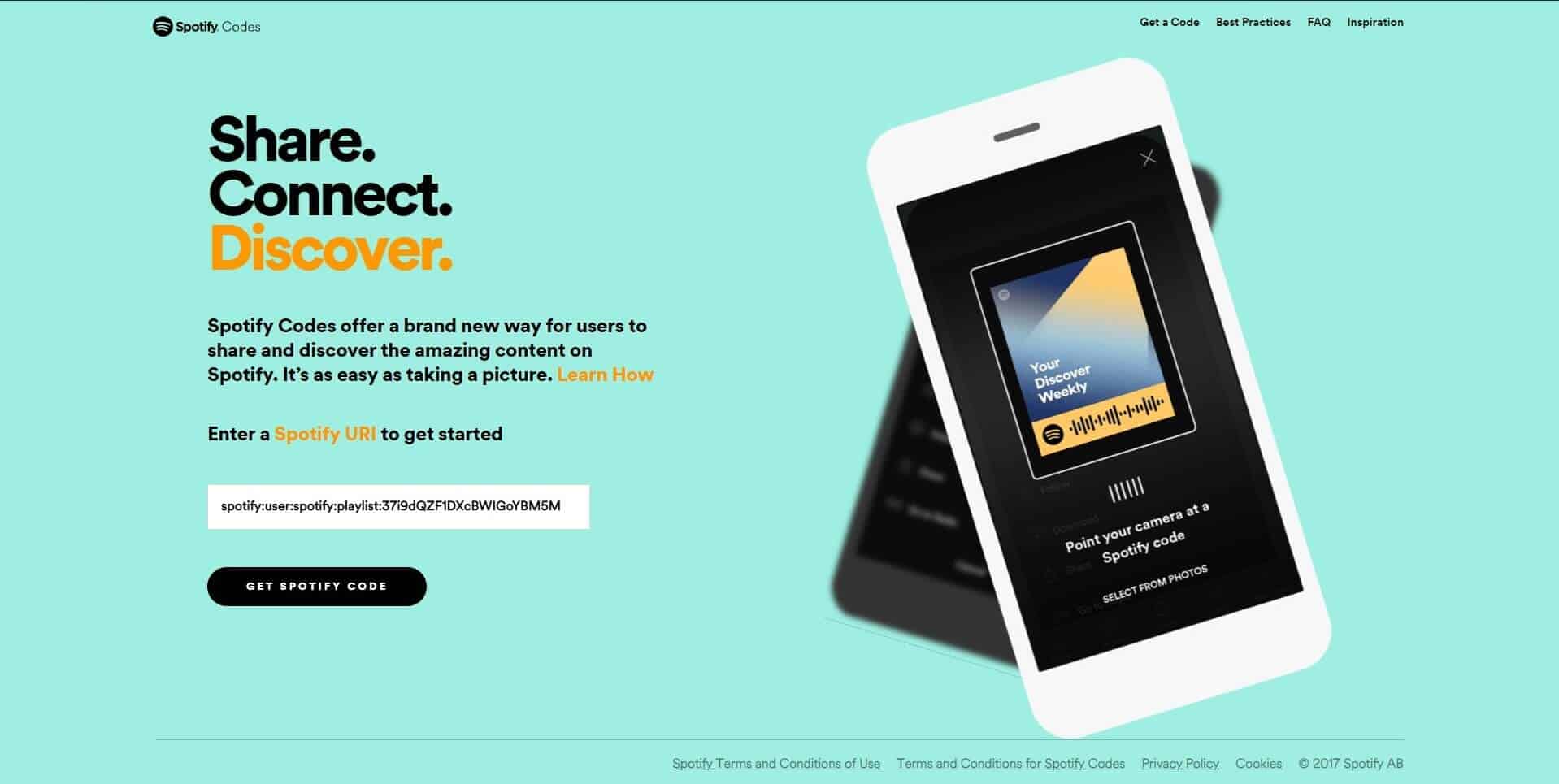
Spotifycodes.com can help you generate codes of your albums and songs.
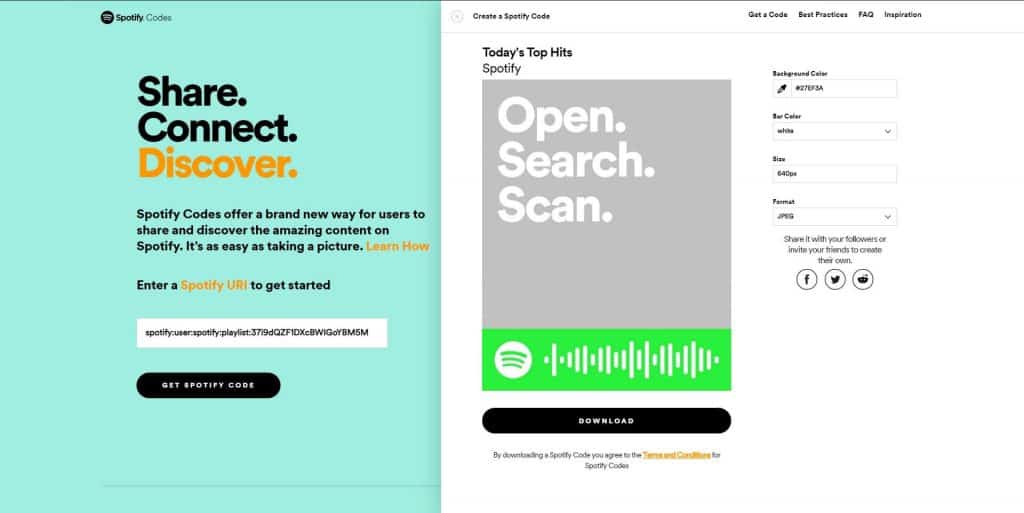
You can generate Spotify Codes from here.
What does URI mean and what does it stand for?
URI stands for Uniform Resource Identifier. It is a sequence or a string of characters that identifies a particular logical or physical resource. A URI typically includes a string of characters for the filename and it also may contain the path of the directory where the file is located. There are two different types of URIs which are URLs(Uniform Resource Locator) and URNs(Uniform Resource Name). The hierarchy can be represented with the image below.
Difference between Spotify Url and Spotify Uri.
URI in Spotify is just a unique resource identifier which is used for identifying and locating artists and albums on the platform while a Spotify URL does the same job and is a little bit more user-friendly and it is also clickable when inside chatting apps or in the browser. Now see how to change Spotify username?
Web API
Based on simple REST principles, the Spotify Web API endpoints return JSON metadata about music artists, albums, and tracks, directly from the Spotify Data Catalogue.

Web API also provides access to user related data, like playlists and music that the user saves in the Your Music library. Such access is enabled through selective authorization, by the user.
The base address of Web API is https://api.spotify.com. The API provides a set of endpoints, each with its own unique path. To access private data through the Web API, such as user profiles and playlists, an application must get the user’s permission to access the data. Authorization is via the Spotify Accounts service.
Requests
The Spotify Web API is based on REST principles. Data resources are accessed via standard HTTPS requests in UTF-8 format to an API endpoint. Where possible, Web API uses appropriate HTTP verbs for each action:
| Method | Action |
|---|---|
| GET | Retrieves resources |
| POST | Creates resources |
| PUT | Changes and/or replaces resources or collections |
| DELETE | Deletes resources |
Spotify URIs and IDs
In requests to the Web API and responses from it, you will frequently encounter the following parameters:
| PARAMETER | DESCRIPTION | EXAMPLE |
|---|---|---|
| Spotify URI | The resource identifier that you can enter, for example, in the Spotify Desktop client’s search box to locate an artist, album, or track. To find a Spotify URI simply right-click (on Windows) or Ctrl-Click (on a Mac) on the artist’s or album’s or track’s name. | spotify:track:6rqhFgbbKwnb9MLmUQDhG6 |
| Spotify ID | The base-62 identifier that you can find at the end of the Spotify URI (see above) for an artist, track, album, playlist, etc. Unlike a Spotify URI, a Spotify ID does not clearly identify the type of resource; that information is provided elsewhere in the call. | 6rqhFgbbKwnb9MLmUQDhG6 |
| Spotify category ID | The unique string identifying the Spotify category. | party |
| Spotify user ID | The unique string identifying the Spotify user that you can find at the end of the Spotify URI for the user. The ID of the current user can be obtained via the Web API endpoint. | wizzler |
| Spotify URL | An HTML link that opens a track, album, app, playlist or other Spotify resource in a Spotify client (which client is determined by the user’s device and account settings at play.spotify.com. | http://open.spotify.com/track/6rqhFgbbKwnb9MLmUQDhG6 |
Responses
Web API responses normally include a JSON object. Browse the reference documentation to find descriptions of common responses from each endpoint.
Timestamps
Pagination
Some endpoints support a way of paging the dataset, taking an offset and limit as query parameters:
In this example, in a list of 50 ( total ) singles by the specified artist : From the twentieth ( offset ) single, retrieve the next 10 ( limit ) singles.
Conditional Requests
Most API responses contain appropriate cache-control headers set to assist in client-side caching:
Response Status Codes
Web API uses the following response status codes, as defined in the RFC 2616 and RFC 6585:
Response Schema
Web API uses two different formats to describe an error:
Authentication Error Object
Whenever the application makes requests related to authentication or authorization to Web API, such as retrieving an access token or refreshing an access token, the error response follows RFC 6749 on the OAuth 2.0 Authorization Framework.
| Key | Value Type | Value Description |
|---|---|---|
| error | string | A high level description of the error as specified in RFC 6749 Section 5.2. |
| error_description | string | A more detailed description of the error as specified in RFC 6749 Section 4.1.2.1. |
Here is an example of a failing request to refresh an access token.
Regular Error Object
Apart from the response code, unsuccessful responses return a JSON object containing the following information:
| Key | Value Type | Value Description |
|---|---|---|
| status | integer | The HTTP status code that is also returned in the response header. For further information, see Response Status Codes. |
| message | string | A short description of the cause of the error. |
Here, for example is the error that occurs when trying to fetch information for a non-existent track:
Authentication
All requests to Web API require authentication. This is achieved by sending a valid OAuth access token in the request header. For more information about these authentication methods, see the Web API Authorization Guide.
Spotify Community
Need help? Check out our FAQs for solutions to a wide range of topics.
URI Codes
I can’t seem to get URI codes to put up on a website. I read some of the articles in this community about it, yet no one actually provides an answer as to how to do it. It is said if you have the URL link it’s easy to find the URI, so apparently i’m an **bleep**! Can someone please explain how to get to the URI codes without posting their actual playlist?!
First, I show you 3 Spotify urls and 3 Spotify URI’s for artist, album and song. The asterisks are added to keep them from turning into play buttons.
This is the URL (website address)
In the desktop Spotify client you can get it by clicking the three dots on song/album/artist, going to Share and selecting «Copy song/album/artist link».
What’s common between the two is this long line of code (eg. 27ftYHLeunzcSzb33Wk1hf) and whether it’s an album, artist or a song.
So when you’ve got a Spotify url and you need to turn it into an URI, or vice versa, it’s very simple.
You can get both website addresses and URI’s for your playlists and profile as well. Playlist ones appear longer than others and asterisks are added to avoid play buttons.
URL (website address)
Basically, when you want to turn an URL into URI, then delete everything except for ‘spotify’, ‘artist’/’song’/’album’/’user’ and ‘playlist’ and the lengthy code, and then add colons between them.
You don’t need «?si=sBS05mmQRv6qo2udnQNUPw» included in your URI. Both website address and the URI work perfectly fine without it.
Local Files in Spotify Playlists
In this guide we discuss how local files are exposed in the Spotify Web API Playlist endpoints.
What Are Local Files?
Spotify allows you to play your own collection of music files from within the Spotify client. These tracks appear alongside the music available on Spotify and can be included in users’ playlists, even if that particular track is not available on Spotify itself. For more information on local files, please read our support article.
The Web API can retrieve the contents of playlists, including information on any local files that have been added, via the playlist endpoints.
Identifying Local Files
Requesting the contents of a playlist returns a set of track objects along with extra information about that track’s instance in the playlist. For example:
The key part here is the new property «is_local» which should be used to determine whether the track is a local file.
The Track Object for a Local File
The structure of a Spotify track object for a local file is identical to that of a regular Spotify track, with some notable differences in available data:
The local file information is read by the client software when the file was added to the playlist. Although as much information as possible is taken from the local file, some may be missing so this information is not guaranteed to exist for all local files.
Understanding the Local File URI
The local file URI is constructed from information extracted from the local file when it was added to the playlist as follows:
All available information is also used to populate the object album name, artist name, track name and track duration properties, so parsing this directly should not be necessary.
How Should I Render Local Files to the User?
Whether you display these files to your app’s users is entirely dependent on the functionality that you require in your app. Initially, you could “grey out” the tracks or hide them altogether. If you have access to the filesystem, you could use the information to match the track to the file and replicate the Spotify clients’ behaviour. Or perhaps use the title and artist information to perform a search in the Spotify catalogue.
Limitations
Content Linking Guide
This guide primarily covers content linking for mobile app developers working in the native environment, where it is possible to detect Spotify. If you are linking to Spotify content from the web, refer to the Web Links section below.
Best Experience: Open Spotify content in Spotify
On all major platforms (Android, iOS, MacOS, Windows), the Spotify app registers the spotify: URI scheme for handling deeplinks. These URIs are found in entities returned from the Spotify Web API under the uri field.
When Spotify is installed, navigating directly to content in the Spotify app provides the best user experience, since it brings Spotify to the foreground with the selected content. However, you must first determine whether Spotify is present on the device.
Detecting Spotify
Detecting Spotify from iOS Apps
Your app must declare its intent to detect Spotify. Add spotify under the LSApplicationQueriesSchemes key in your project’s Info.plist :
Pass a Spotify URI to canOpenURL on the UIApplication class to determine if Spotify is installed:
Detecting Spotify from Android Apps
Opening Spotify Content in the Spotify App
Once you’ve determined Spotify is installed, you can navigate directly to Spotify deeplinks.
Pass a Spotify web link to the openURL method of the UIApplication class to open the content in the Spotify app. A web link is preferred over a spotify: deeplink in this scenario because a deeplink will trigger an iOS confirmation prompt before switching to Spotify. Spotify handles the web link through the Universal Links mechanism.
Android
Start an activity for an ACTION_VIEW Intent, passing your app’s package name in the EXTRA_REFERRER field.
Installing Spotify
Follow the steps below if you wish to link users directly to the app store so that they can install Spotify. Spotify partners with Adjust for mobile install attribution.
Trigger the Adjust tracker URL. Pass your application’s bundle ID in the campaign parameter. It is also important that you set the user agent to spotify_campaign_user_agent so the request is processed correctly:
Open Spotify in the App Store:
Android
Open Spotify in the Google Play Store, passing your application’s package name in the adjust_campaign parameter within the referrer :
Fallback Experience: Web Links
If the user doesn’t have Spotify installed or you’re otherwise unable to detect Spotify, you should open Spotify web links (open.spotify.com) in the system browser or a webview.
Web links are provided in Web API entities under the external_urls.spotify field.
Attribution
In order for Spotify to attribute traffic to your app, pass your application’s Android package name or iOS bundle ID in the utm_campaign query string parameter. For example: https://open.spotify.com/track/55fmthmn3rgnk9Wyx7G5dU?utm_campaign=com.app
Allow Deeplinking from Webviews
Content at open.spotify.com links directly into Spotify or the app store. By default, both Android and iOS restrict webviews and prevent deeplinking into apps.
Support deeplinks by ensuring the webview handles the following schemes: